
Cannot successfuly create GIS Maps
17 February, 2014
Hi
I've read all the forum topics on mapping, but can only successfully create the 'Google Map'. I would like to create some of the GIS Maps, but cannot get any of the layers to show up.
I followed the discussion here and was able to create the required GIS point using the concat formula suggested by one user:
concat('Point(',Latitude, ' ',Longitude, ')')
Followed tutorial here to convert the data. In step 4, where it asks to select Country for the cache field, I did not have this field available (as it no doubt relates specifically to the Ski Demo data. I tried using 'Postcode' and 'None', with no difference in the end results.
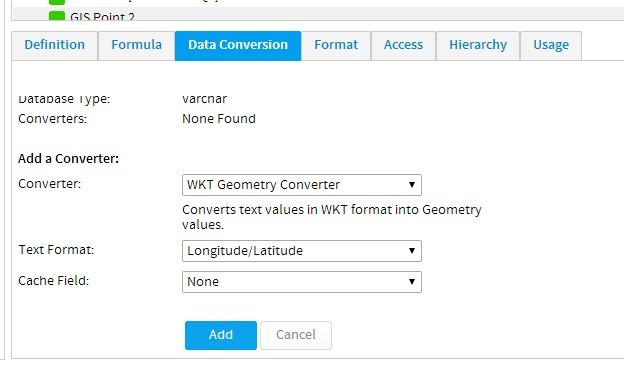
'GIS Geometry' converted data type is shown for both.

In the view summary, GIS Point data is showing for both attempts
But in report builder, data is only being recognised for the field where the cache 'Postcode' was selected.
Choosing the GIS Google map, I am unable to create it using either version of the GIS Point data.
For the chart created with the first GIS Point data ('Postcode' cache field chosen) - neither the map nor the data loads
With the chart created with the second GIS Point data (no cache field) - the map loads, but there is no data on it.
I have also tried, GIS Map/GIS Bubble Map/GIS Heat Map.
For all of these options, I cannot get the layers to show up.
As an example, this is what I can create
I have tried every layer available in both the 'Report Search' and 'WMS Layer' sections.
Have also tried various setting- foreground, opacity, zoom levels, selectable, hover navigation, etc...but am unable to get a single map to show.
Any help would be appreciated!
I've read all the forum topics on mapping, but can only successfully create the 'Google Map'. I would like to create some of the GIS Maps, but cannot get any of the layers to show up.
I followed the discussion here and was able to create the required GIS point using the concat formula suggested by one user:
concat('Point(',Latitude, ' ',Longitude, ')')
Followed tutorial here to convert the data. In step 4, where it asks to select Country for the cache field, I did not have this field available (as it no doubt relates specifically to the Ski Demo data. I tried using 'Postcode' and 'None', with no difference in the end results.
'GIS Geometry' converted data type is shown for both.

In the view summary, GIS Point data is showing for both attempts

But in report builder, data is only being recognised for the field where the cache 'Postcode' was selected.

Choosing the GIS Google map, I am unable to create it using either version of the GIS Point data.
For the chart created with the first GIS Point data ('Postcode' cache field chosen) - neither the map nor the data loads

With the chart created with the second GIS Point data (no cache field) - the map loads, but there is no data on it.

I have also tried, GIS Map/GIS Bubble Map/GIS Heat Map.
For all of these options, I cannot get the layers to show up.
As an example, this is what I can create

I have tried every layer available in both the 'Report Search' and 'WMS Layer' sections.
Have also tried various setting- foreground, opacity, zoom levels, selectable, hover navigation, etc...but am unable to get a single map to show.
Any help would be appreciated!
Noticed that I had latitutde/longitude round the wrong way in settings.
This is why my data didn't create the shape of Australia as I was expecting.
Fixed that, and it's looking great-
But still cannot get a layer to work.
This is why my data didn't create the shape of Australia as I was expecting.
Fixed that, and it's looking great-

But still cannot get a layer to work.
Hi Samuel,
Sorry for the delays, looks like you have sorted yourself out.
Nice work!
Please let us know if there was anything else you were after.
Regards,
David
Sorry for the delays, looks like you have sorted yourself out.
Nice work!
Please let us know if there was anything else you were after.
Regards,
David
Hi David
Not completely sorted. I cannot get the layers to show up behind the heat maps.
Not completely sorted. I cannot get the layers to show up behind the heat maps.
Hi Samuel,
This wiki post has information on how to set a WMS layer as a background layer for your report:
http://wiki.yellowfin.com.au/display/USER70/Map+Interaction#MapInteraction-LayerSelection
You will need to have configured/conntected to a WMS layer in the Images and Maps menu under Administration:
http://wiki.yellowfin.com.au/display/USER63/WMS+Layers
Regards,
Cameron
This wiki post has information on how to set a WMS layer as a background layer for your report:
http://wiki.yellowfin.com.au/display/USER70/Map+Interaction#MapInteraction-LayerSelection
You will need to have configured/conntected to a WMS layer in the Images and Maps menu under Administration:
http://wiki.yellowfin.com.au/display/USER63/WMS+Layers
Regards,
Cameron
Thanks Cameron
I found the second wiki to be much more useful, and the layers are now working.
The reports are quite slow to load, and makes me hesitant to publish them to clients.
(This may be beyond scope of YF support forums- but thought may still be helpful to other users)
Exploring around, it appears the WMS layers provided with installation have been sourced from 2 places:
http://132.156.10.87/cgi-bin/atlaswms_en
http://www2.demis.nl/mapserver/request.asp
For what its worth, I can only connect to the second one to add/remove layers.
I presume these are freely provided WMS layers?
Is there a way to import all the data and store on our own servers to improve the loading time?
I found the second wiki to be much more useful, and the layers are now working.
The reports are quite slow to load, and makes me hesitant to publish them to clients.
(This may be beyond scope of YF support forums- but thought may still be helpful to other users)
Exploring around, it appears the WMS layers provided with installation have been sourced from 2 places:
http://132.156.10.87/cgi-bin/atlaswms_en
http://www2.demis.nl/mapserver/request.asp
For what its worth, I can only connect to the second one to add/remove layers.
I presume these are freely provided WMS layers?
Is there a way to import all the data and store on our own servers to improve the loading time?