
 Why Embedded Analytics Breaks at Scale if You Don’t Design for It Early
The shift from adding charts to delivering a multi-tenant analytics product
Embedded analytics is no longer a nice extra. It now shapes revenue, retention, and the customer experience. A few charts in one customer portal can look fine. The same setup starts to crack when it serves hundreds of tenants, each with different data, access rules, and branding.
That is the core shift. Teams move from one-off embeds to a product layer that must run across many customer environments. The work is not just visual. It touches latency, isolation, governance, and cost control.
This is where planning matters. SaaS teams that treat analytics as a key product from day one move faster later. They ship without piling up support tickets, slow dashboards, or security gaps.
Why this matters to YellowfinBI users and business leaders
Yellowfin users know this problem well. Product teams want embedded analytics that feel native. BI teams want control and less manual work. Leaders want adoption, self-service, and clearer decisions.
That mix creates a practical test. Can the analytics layer support more users without more chaos?
Yellowfin fits that brief with embedded analytics, white-label options, and thoughtful AI-driven features such as Ask Yellowfin, Code Assistant, AI NLQ, Assisted Insights, and Signals. The value is simple. Better answers, less friction, and less time spent building a custom BI stack.
What Scaling Embedded Analytics Across Customers Really Means
From single-tenant dashboards to enterprise-grade multi-tenant experiences
Scaling embedded analytics across customers means one analytics layer serves many customer environments. Each tenant may have its own data, permissions, layouts, and usage patterns. The product must treat those differences as normal.
Once scale enters the picture, the architecture changes fast. Tenant isolation matters. So do performance, personalization, and governance. A dashboard that works for one customer can become a bottleneck for thousands.
A useful analogy helps here. One dashboard embed is a storefront. Scaled embedded analytics is a franchise network. The brand stays consistent, but each location runs with local rules and demand.
The business case: adoption, retention, and new revenue
This is not just an IT task. Embedded analytics becomes part of the product itself. It can raise retention because users stay inside the app for answers. It can also support upsell paths when analytics is part of a premium tier.
There is another benefit. Better analytics often lowers churn because customers get more value from the platform they already use.
Yellowfin supports that model with native-feeling embedded analytics, white-label controls, and faster time to market.
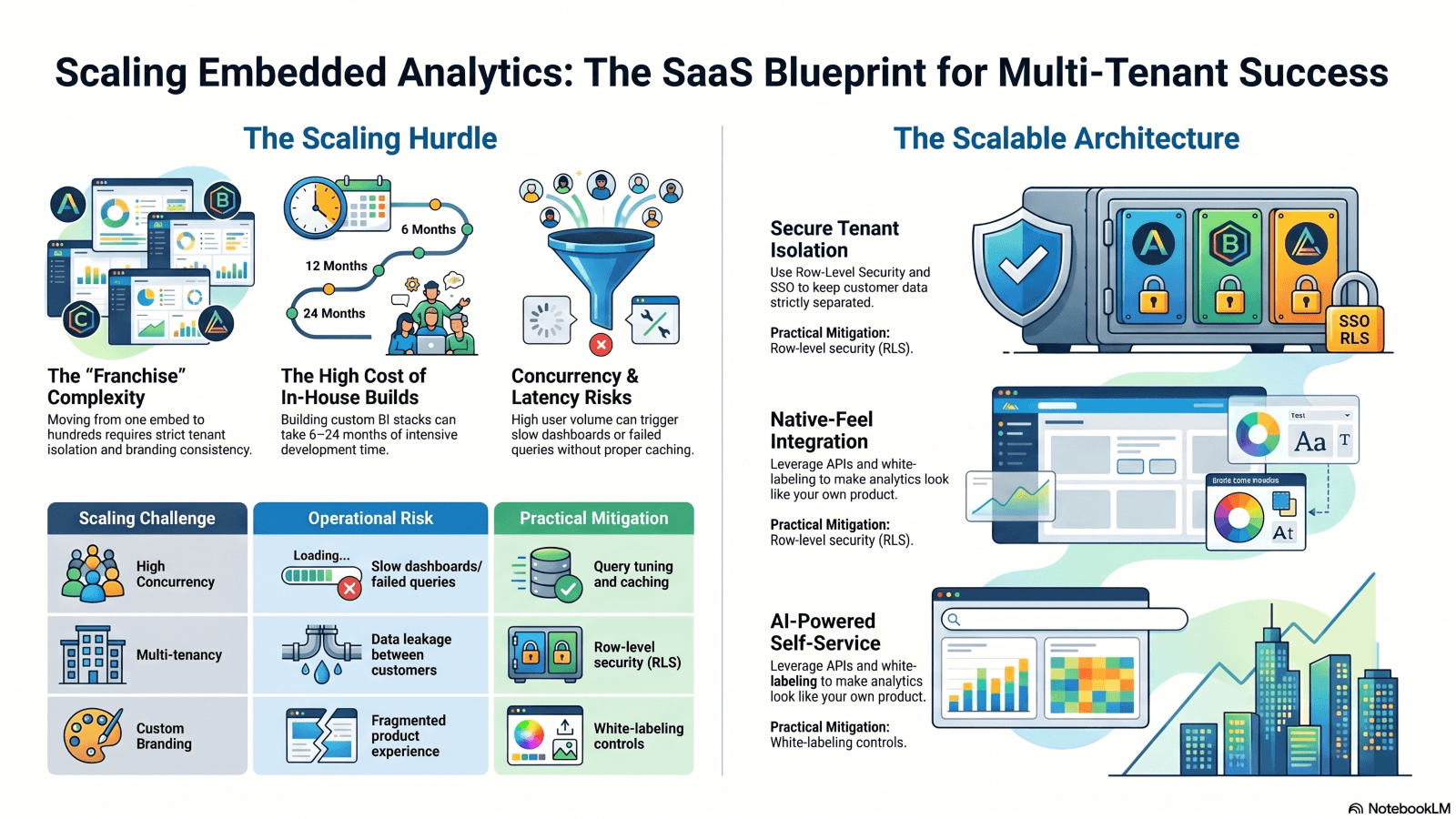
The Core Challenges of Scaling Embedded Analytics Across Customers
Performance, concurrency, and query latency
In large organizations and multi-tenancy deployments, there are potentially thousands of users trying to query live data at the same time, especially when something significant is announced. That sudden strain shows up in databases, APIs, and front-end rendering. Even a good dashboard can slow down when everyone opens it at once.
The usual fixes still apply. Cache repeated queries. Push heavy work into columnar systems. Separate workloads so one tenant does not crowd out another.
When teams skip this work, they get long load times and failed requests. When they plan for it, dashboards stay useful under pressure.
Multi-tenancy, security, and customization at scale
Tenant isolation and shared infrastructure often pull in opposite directions. That tension sits at the center of multi-tenant analytics. Security teams want strict boundaries. Product teams want shared services and fast delivery.
The basics are clear. Use row-level security. Add SSO. Keep audit logs. Make permissions tenant-aware. These controls matter even more when customers expect compliance support.
Customization adds another layer. White-label branding, custom roles, and tenant-specific views can become messy fast if each customer gets a special build.
| Scaling Challenge | Operational Risk | Practical Mitigation |
| High concurrency | Slow dashboards, failed queries | Caching, query tuning, live-data setup |
| Multi-tenancy | Data leakage between customers | Row-level security, tenant-aware permissions |
| Custom branding | Fragmented product experience | White-label controls, theme settings |
| Cost growth | Surprise infrastructure spend | Usage monitoring, workload controls |
| Compliance | Audit gaps and access issues | SSO, logging, governance policies |
Architecture Patterns That Make Embedded Analytics Scale
Data layer choices: live, cached, federated, or hybrid
There is no single data pattern that fits every SaaS product. Live querying works when freshness matters. Cached analytics works when users run the same reports often. Federated access helps when data lives across systems. A hybrid model fits many teams best.
Hybrid is usually the practical choice. It lets teams use live data for operational views, cached data for speed, and federated access where duplication makes no sense. That balance is common in modern analytics design.
The key is matching the pattern to the use case, not forcing every dashboard into the same shape.
Tenant-aware infrastructure and workload isolation
“Bursty” traffic from one customer should not slow everyone else down. That is why a tenant-aware infrastructure matters. Isolate heavy workloads. Use autoscaling where possible. Give large customers their own sandbox or compute path when needed.
This reduces noisy-neighbor problems and keeps SLA performance steady. It also lets SaaS teams support more customers without splitting into many separate BI stacks.
For Yellowfin users, that means one embedded analytics layer can serve many customer groups while still feeling stable and responsive.
| Pattern | Best For | Pros | Trade-offs |
| Live querying | Operational dashboards | Fresh data, fast decisions | Needs tuning and strong infra |
| Cached analytics | Repeated use cases | Fast response, lower cost | Data freshness lag |
| Federated access | Distributed data estates | No duplication, wide access | Harder governance |
| Hybrid model | Enterprise SaaS platforms | Balanced control and performance | Needs orchestration |
How Yellowfin Helps Teams Deliver Embedded Analytics That Feel Native
White-labeling, APIs, and seamless product integration
Adoption rises when analytics feels like part of the app, not a bolt-on. That means matching the host product’s look and behavior. Yellowfin supports that with lightweight JavaScript embedding and secure iframe options, plus white-label controls for branding. Delphi, C++, Java, and .Net developers can easily embed Yellowfin too and by using the included white-labeling capabilities they can get a totally blended look, truly making it part of their own apps.
That matters to users too. When the analytics layer fits the product, trust goes up and support questions go down. Teams spend less time explaining where the app ends and the BI tool begins.
Yellowfin’s embedded analytics position is built around that idea, with analytics that feel native to the product. That is a practical win for SaaS teams that care about speed and product quality.
AI-powered self-service and conversational analytics at scale
AI reduces the workload for analytics teams. “Ask Yellowfin”, the Code Assistant, AI NLQ, Assisted Insights, and Signals let business users ask questions without waiting on a specialist.
That reduces dependency on analysts and shortens the path from question to answer. It also gives product teams a stronger self-service story.
Yellowfin 9.17 adds more AI-powered capability for conversational use cases. That matters when thousands of users need quick answers, not another queue for report requests.
Governance, Security, and Compliance Must Scale Too
Building trust with SSO, RBAC, RLS, and auditability
A scaled embedded analytics setup needs enterprise-grade access control. SSO keeps login simple. JWT-based auth helps with session control. Role-based access control sets who can see what. Row-level security keeps tenant data separated. Audit logs give teams a record of who did what.
These controls are not extras. They are included as part of the product.
A shared dashboard can become a shared risk if the security model is weak. One bad permission rule can expose data across tenants. One weak audit trail can create a compliance mess.
That risk grows fast in regulated sectors. Finance, healthcare, telecom, and public sector teams need clear boundaries and traceable access. Yellowfin’s enterprise deployment model fits that need by supporting controlled access and governed analytics at scale.
Cost Control and Operational Efficiency for Long-Term Scale
Predictable usage-based economics instead of runaway infrastructure costs
Embedded analytics can get expensive when query volume grows faster than planning. The fix starts with usage patterns. Watch query frequency. Tune caches. Set retention policies. Meter usage in a way that matches value, not just seats.
That model keeps cost tied to actual consumption. It also helps product teams explain economics to leadership with less guesswork.
Yellowfin helps teams avoid building and maintaining a custom analytics stack from scratch, which cuts both engineering load and long-term overhead.
Where automation delivers the biggest ROI
The best automation targets are repetitive jobs. Provisioning. Permission changes. Dashboard refreshes. Alert routing. Those tasks add up fast at scale.
Predictive scaling and serverless patterns also help where traffic changes by tenant or by time of day. The result is simpler operations and cleaner margin control.
A Step-by-Step Framework for Scaling Embedded Analytics Across Customers
Start with the highest-value customer use case
Begin with one or two workflows that matter most. Pick the dashboard or report that users check often and that leaders care about.
Then define the numbers that matter. Adoption. Time to insight. Query response time. Support volume. If those measures move in the right direction, the rollout has traction.
Standardize, then personalize
The smart order is simple. Build a shared core first. Then add tenant-level flexibility where it matters.
A good rollout path looks like this:
- Core data model
- Governance and permissions
- Branding and embed layer
- AI and self-service features
- Usage monitoring and tuning
That sequence keeps the base stable while leaving room for customer-specific needs.
Scale Embedded Analytics Without Sacrificing Speed, Trust, or Experience
Key takeaways for SaaS leaders and analytics teams
Scaling embedded analytics across customers takes more than adding charts. It needs a product mindset, clear governance, tenant isolation, strong performance, and cost control. Teams that plan for those parts early avoid painful rebuilds later.
Yellowfin fits this model well. It gives SaaS teams embedded analytics, AI-driven insights, white-label flexibility, and enterprise-scale reliability in one place.
What next?
Review the latest AI-powered features in Yellowfin 9.17.
Download The Power BI Alternative: Yellowfin Migration Guide.
Try Ask Yellowfin and Code Assistant.
Request a demo or try Yellowfin and see how embedded analytics can scale across customers.