

From Dashboards to Decision Flows: Embedded Analytics That Trigger Action
Teams have more dashboards than ever. They also have more dashboard fatigue.
Metrics are easy to display. Decisions are harder. A chart can show a drop in revenue, but it rarely tells a product leader what to do next. That gap is why many teams stay stuck in review mode instead of action mode.
This is where decision-centric analytics changes the pattern. The goal is not more visibility. The goal is faster recognition, better understanding, and clear follow-through when something changes.
So the practical question is simple: how do you design analytics experiences that move from visibility to action?
Three parts matter most. First, alerting, so people know when change needs attention. Second, guided exploration, so they can see why it happened. Third, embedded next-best actions, so the response lives inside the workflow.
That is Yellowfin's view too. Analytics should not just inform. It should trigger decisions where work happens. That idea fits well with the broader case for data-driven decision-making discussed by Harvard Business Review.
Why Static Dashboards Create Decision Paralysis
Static dashboards usually stop at "what happened." That sounds useful until someone needs to act.
A revenue dip appears. A churn spike lands on a weekly report. A service metric slips below target. Then the work starts. Business users have to interpret the signal, find the cause, decide the response, and route it to the right owner.
That is a heavy lift for anyone. It is worse for executives and product leaders. They need fast, clear calls, not another round of chart reading.
Common failure points show up fast:
- KPI sprawl
- alert blindness
- unclear ownership
- no embedded action path
The result is decision delay. People see the problem, then wait for someone else to explain it.
The business cost of passive analytics
Passive analytics slow down response times. They can miss revenue leaks. They can also let small anomalies grow into bigger ones.
Gartner's work on decision intelligence reflects this shift well. Reporting alone is not enough. Teams need analytics that support choices, not just record events.
Yellowfin fits that need with real-time insights, Signals, Stories, and embedded analytics that point users toward the next step. That matters when a business cannot afford to wait for a weekly review cycle.
What Do We Mean By Decision-Centric Analytics?
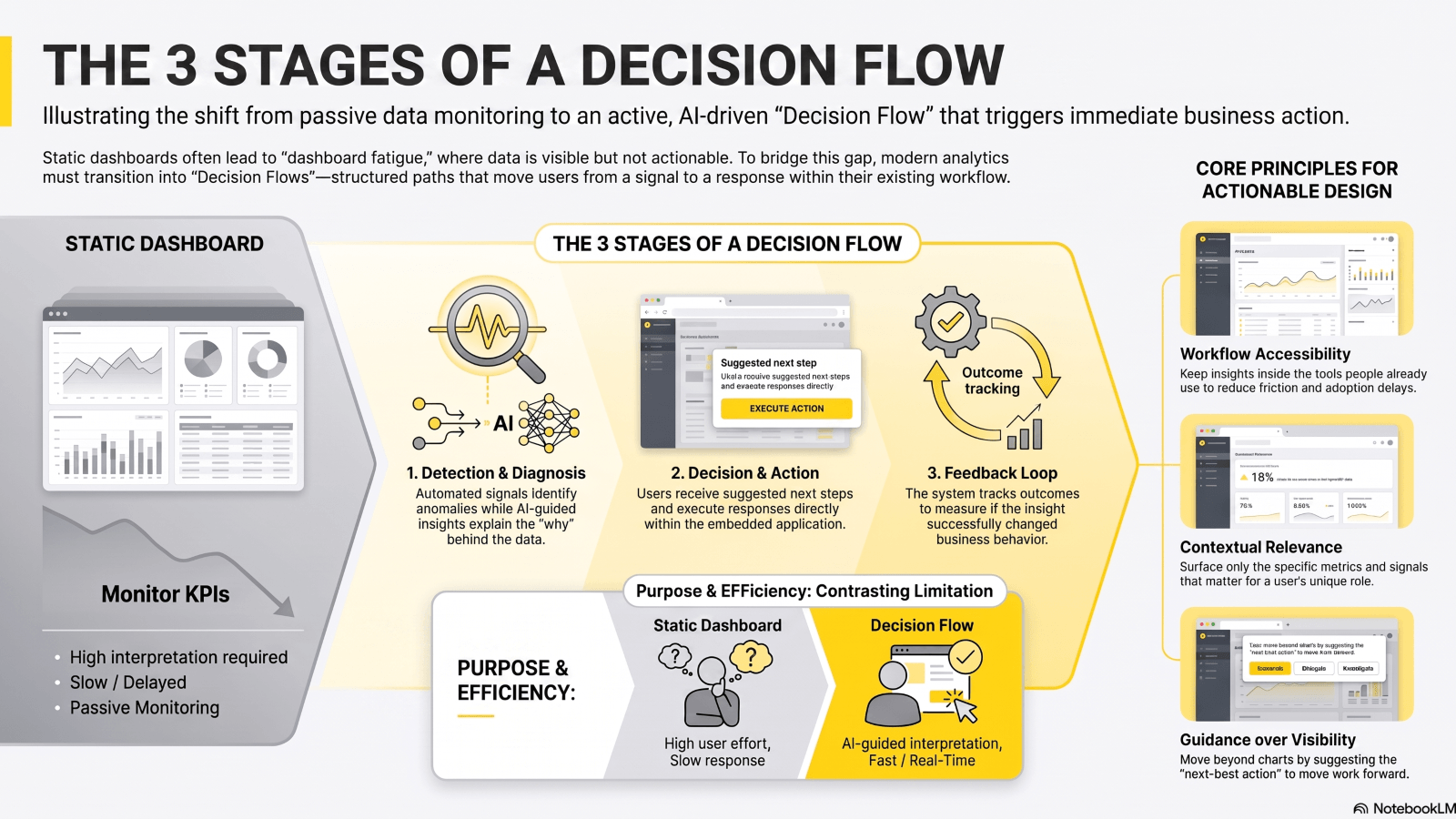
A decision flow is a structured path from signal to action.
It usually moves through five stages:
- Detection
- Diagnosis
- Decision
- Action
- Feedback
That flow cuts time-to-insight and time-to-action. It also gives users a path, instead of asking them to build one from scratch every time.
Here is the difference in plain terms.
| Dimension | Static Dashboard | Decision Flow |
| Purpose | Monitor KPIs | Trigger action |
| User effort | High interpretation effort | Guided interpretation |
| Response speed | Slow | Fast |
| Context | Limited | Embedded |
| Outcome | Awareness | Decision + follow-through |
What are the core design principles for action-triggering analytics?
Five design rules matter.
- Relevance: show the metrics that matter for the role.
- Timeliness: surface change as it happens.
- Context: explain why a KPI moved.
- Guidance: suggest the next step.
- Accessibility: keep insight inside the tools people already use.
That last point matters a lot. If users must leave the app to act, many will not act fast enough.
Building Actionable Analytics with Alerting, Exploration, and Next-Best Actions
Alerts give teams early warning. Good alerts cut through noise. Bad alerts train users to ignore them.
Threshold-based alerts still matter. So does anomaly detection. IBM explains anomaly detection as the process of finding patterns that do not fit expected behavior. That is useful in business settings where a small shift can signal a larger issue.
Good alert design follows a few rules:
- Prioritize material changes
- Route alerts by role and ownership
- Include context, not just a note
- Keep the alert tied to a clear action
Yellowfin Signals fit this pattern well. They watch for real-time change and flag what needs attention. That helps teams react before a small issue becomes a larger one.
Guide exploration so users can answer "why did this happen?"
An alert without explanation is only half the job.
Once a shift appears, users need a path to the cause. That means guided drill-downs, context-aware commentary, and AI support that lowers the effort of investigation.
Yellowfin's AI NLQ, Assisted Insights, and Ask Yellowfin help here. Business users can ask questions in plain language. They can move from a chart to an explanation without waiting on an analyst for every follow-up.
That changes team behavior. Analysts spend less time answering repeat questions. Business users get quicker answers. Leaders get a cleaner read on what happened and what needs action.
| Use case | Best pattern | Example outcome |
| Sales drop | Alert + drill-down | Identify region or channel issue |
| Margin decline | Assisted insight | Reveal pricing or cost driver |
| Product churn spike | Embedded KPI + next action | Trigger retention workflow |
| SLA breach | Real-time signal | Escalate to operations owner |
Designing Embedded Analytics That Fits the Workflow
Analytics works better when it sits where work happens.
Separate BI portals often create friction. Users must switch tools, search for the right view, then decide what to do. That delay hurts adoption. It also slows the response.
Embedded analytics removes that gap. It makes insight feel native to the application. The user sees the signal in context, with the right data and the right path forward.
That is why embedded analytics is now a core product move for many software teams. It improves usage. It supports faster decisions. It also gives product leaders a way to make data part of the experience, not a separate task.
What "embedded" should mean for product leaders and executives
For product leaders and C-level teams, embedded should mean more than placing a chart on a page.
It should be:
- White-labeled
- Role-specific
- Secure
- Scalable
It should also fit into:
- Operational workflows
- Approvals
- Escalations
- Customer-facing product decisions
Yellowfin's embedded analytics approach is built for that. It lets teams ship analytics that feel native to the product, without the long build cycle that in-house work often requires.
How Does Yellowfin Help Turn Insight into Action?
Yellowfin maps well to a decision flow model.
- Signals catch change in real time
- AI NLQ lets users ask questions in plain language
- Assisted Insights and Tell Me About My Data explain what changed
- Stories and Presents wrap data in a decision narrative
- Embedded analytics puts insight inside the workflow
This mix matters because no single feature solves the full problem. Alerts tell you something changed. Exploration tells you why. Embedded action paths tell you what happens next.
That is how teams move from passive dashboard use to active decisions.
Why does Yellowfin matter for BI teams and executives?
For BI teams, the value is speed. They get less repeat work and more self-service use.
For executives, the value is clarity. They get the context needed to act with confidence.
For product teams, the value is different. Native analytics can improve adoption and sharpen product value.
Yellowfin 9.17 adds more of this modern experience, including conversational analysis and AI-powered ways to ask questions and build charts on the fly. See the latest AI-powered features in Yellowfin version 9.17. You can also use Ask Yellowfin and Code Assistant to get answers about Yellowfin.
Governance, Trust, and Data Sovereignty in Actionable Analytics
Fast decisions still need trusted data.
Decision flows fail if metrics are inconsistent. They also fail if users see numbers they do not trust. That is why governance matters. Role-based access, clear metric definitions, and controlled distribution all matter in enterprise settings.
Keeping analytics sovereign and scalable
Data sovereignty is also part of the picture and right now it’s a hotter topic than ever. Many teams want more control over where data lives, how it moves, and who can see it. Regulations like SCA, HIPAA, NIST 2.0, and FIPs compliance have become mandatory and there has been a huge increase in customer compliance information requests and disclosures.
That is why resources like the on-demand webinar on data stack sovereignty matter. They speak to a real need: keep control of the analytics stack while still moving quickly.
Yellowfin fits this need with enterprise-grade governance and embedded delivery that does not force teams to give up control.
Practical Framework - How to Move from Dashboards to Decision Flows
A simple rollout model works well.
- Identify the decision - What business action should the insight drive?
- Define the signal - What threshold, trend, or anomaly matters?
- Add context - What data or explanation helps users read it?
- Embed the next step - What action should happen next?
- Measure outcomes - Did the alert, insight, or recommendation change behavior?
That sequence keeps the work practical. It also keeps analytics tied to business results.
Questions leaders should ask before redesigning analytics
Before changing a dashboard, ask these five questions:
- What decisions are we trying to speed up?
- Who owns the action after the insight appears?
- Where should the insight appear to drive adoption?
- How will we reduce noise and build trust?
- What KPI shows the experience is changing behavior?
Those questions separate busy reporting from useful decision design.
Conclusion - Analytics Should Inform Decisions and Trigger Them
Dashboards still matter. But dashboards alone do not move work forward.
Modern analytics needs to do more. It should alert teams when change matters. It should guide them to the cause. It should then place the next best action in the flow of work.
That is where Yellowfin helps. With embedded analytics, AI-powered insights, Signals, and Stories, teams can build experiences that support faster decisions and cleaner follow-through.
See how embedded analytics can feel native to your product, watch an on-demand webinar, or request a demo to see how decision flows work in practice.