
Accumulative total & % not working correctly
14 March, 2014
I have a column-based report with subqueries showing client data by week. One of the subqueries shows terminated clients. When I try to add columns in this subquery to show accumulative totals and accumulative percentages, the data does not display as I expect or want.
For example, if, as is the case, 0 clients terminate in Week 1, 2 in Week 2, 0 in Week 3, the accumulative total should show 0 in Wk 1, 2 in Wk 2, 2 in Wk 3, but it shows 0 again in Wk 3.
I want the accumulative percentage to show as a cumulative percentage against the total clients, so it should show 0% in Wk 1, 2/41 as % in Wk 2, 2/106 as % in Wk 3. See attached file.
For example, if, as is the case, 0 clients terminate in Week 1, 2 in Week 2, 0 in Week 3, the accumulative total should show 0 in Wk 1, 2 in Wk 2, 2 in Wk 3, but it shows 0 again in Wk 3.
I want the accumulative percentage to show as a cumulative percentage against the total clients, so it should show 0% in Wk 1, 2/41 as % in Wk 2, 2/106 as % in Wk 3. See attached file.
Hi Tracy,
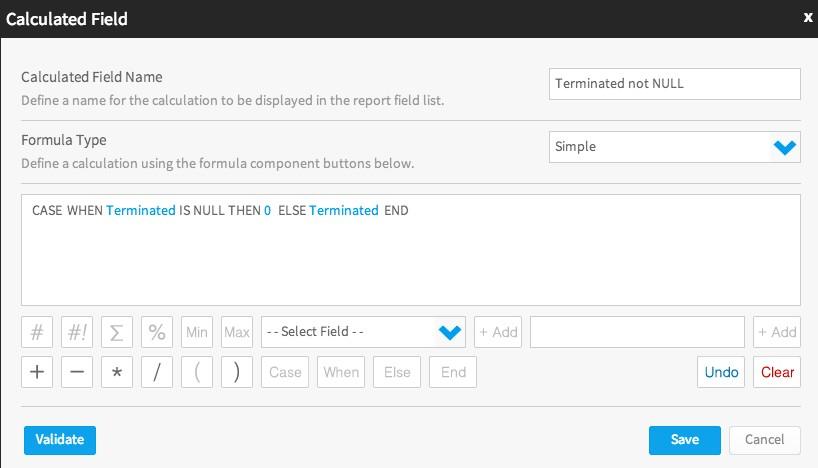
1. I believe the accumulative total of terminated clients is showing incorrect values because the underlying column contains values. What you can do is either replace with zeroes in the database or create a calculated field either in the view or in the report that would do it and then apply the "Accumulative total" advanced function to this field:

2. The "Accumulative percentage" function only shows the percentage of the grand total accumulated by a given row in the column the function is applied to. For example, it would show the following:
[code] Value Accumulative Accumulative
total percentage
1 1 25%
1 2 50%
1 3 75%
1 4 100%
Total: 4[/code]
Unfortunately, there is no function in Yellowfin as of yet that would calculate the percentage of two columns' accumulative totals.
I'm afraid you might have to use quite a bit of freehand SQL in order to achieve what you are after here.
Feel free to tell me if you need further advice on this.
Kind Regards,
Artem
1. I believe the accumulative total of terminated clients is showing incorrect values because the underlying column contains values. What you can do is either replace with zeroes in the database or create a calculated field either in the view or in the report that would do it and then apply the "Accumulative total" advanced function to this field:

2. The "Accumulative percentage" function only shows the percentage of the grand total accumulated by a given row in the column the function is applied to. For example, it would show the following:
[code] Value Accumulative Accumulative
total percentage
1 1 25%
1 2 50%
1 3 75%
1 4 100%
Total: 4[/code]
Unfortunately, there is no function in Yellowfin as of yet that would calculate the percentage of two columns' accumulative totals.
I'm afraid you might have to use quite a bit of freehand SQL in order to achieve what you are after here.
Feel free to tell me if you need further advice on this.
Kind Regards,
Artem
Thanks for the explanation Artem, but I am not sure that it is correct. The column on which I am trying to get an accumulative total is a count distinct of Constituent ID in the subquery. The subquery is filtered to those constituents with a status of Terminated or Cancelled. It is not clear to me how I should force the count to be 0 rather than null in a row where the count is actually 0? Surely Yellowfin should be able to handle that? However, I have tried adding a field in the view that = 1 when Status = Terminated or Cancelled, and then used that field in the report and it works well for an accumulative total, and it's easier as it means that I don't have to use a subquery.
I cannot work out how to write the SQL for the accumulative % figure unless I use a stored procedure. Do you think it is possible in a view?
Regards
Tracy
I cannot work out how to write the SQL for the accumulative % figure unless I use a stored procedure. Do you think it is possible in a view?
Regards
Tracy
Hi Tracy,
as discussed, your options would be either to:
Option 1: Create a calculated field in the view with SQL like the following
[code]case when Status='Terminated' then 1 else 0 end[/code]
and then roll it up in the report, or to
Option 2: Use a sub-query to get the number of terminated clients per week
then create a calculated field in the MASTER query to replace with zeroes
and get Accumulative Total of it
And you can use a virtual table for more complicated calculations.
Kind Regards,
Artem
as discussed, your options would be either to:
Option 1: Create a calculated field in the view with SQL like the following
[code]case when Status='Terminated' then 1 else 0 end[/code]
and then roll it up in the report, or to
Option 2: Use a sub-query to get the number of terminated clients per week

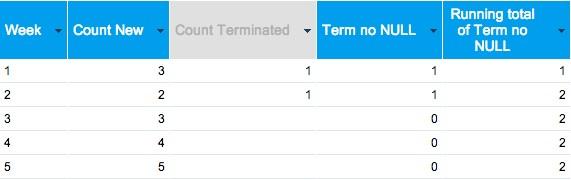
then create a calculated field in the MASTER query to replace with zeroes
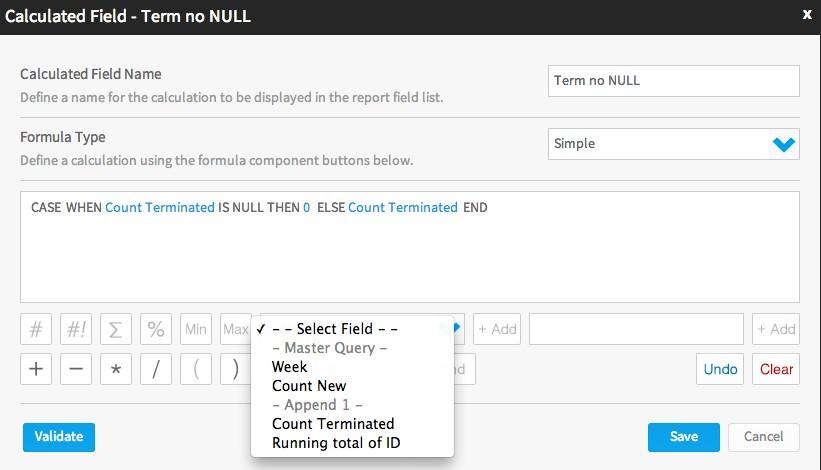
and get Accumulative Total of it
And you can use a virtual table for more complicated calculations.
Kind Regards,
Artem
i really a beginner using yellowfin.
i am sorry if i am asking silly question
i still dont understand how to show grand total in many columns
if you see my pics.. i have to do this one by one.. (i am using yellowfin 6.3)
Please advise
Thank you
i am sorry if i am asking silly question
i still dont understand how to show grand total in many columns
if you see my pics.. i have to do this one by one.. (i am using yellowfin 6.3)
Please advise
Thank you
Hi,
sorry but your pics didn't get attached to this post, so I'm not sure what sort of report you have. But speaking generally, if you just have columns then you can set the total per column as described in this wiki page. Or if you are using Report Sections then you can set the Grand Totals for all columns with one click as described in this wiki page.
regards,
Dave
sorry but your pics didn't get attached to this post, so I'm not sure what sort of report you have. But speaking generally, if you just have columns then you can set the total per column as described in this wiki page. Or if you are using Report Sections then you can set the Grand Totals for all columns with one click as described in this wiki page.
regards,
Dave