
How to sum by column
20 January, 2015
Hi,
My report is displaying account totals by year (single year) and by quarters (all 4).
I would like to sort the report so that it will display accounts with the highest yearly total and then display totals of all 4 quarters per account in descending order.
See attached example (Screenshot #1)

In order to so, I need a column that aggregates by account and year. This column will allow to sort by yearly totals (and will be hidden).
I used the Advanced Function "Sum of Columns" but it did not provided the yearly total - see screenshot #2.

Please advise.
Thanks
Sharon
My report is displaying account totals by year (single year) and by quarters (all 4).
I would like to sort the report so that it will display accounts with the highest yearly total and then display totals of all 4 quarters per account in descending order.
See attached example (Screenshot #1)
In order to so, I need a column that aggregates by account and year. This column will allow to sort by yearly totals (and will be hidden).
I used the Advanced Function "Sum of Columns" but it did not provided the yearly total - see screenshot #2.
Please advise.
Thanks
Sharon
Hello Sharon,
Thank you for posting your question on the forum.
Unfortunately your screenshots didn't come through. I believe
that in order to share images on the forum you need to be
logged in. If you do not have a portal login can send through
your screenshots to support@yellowfin.bi and reference the
title of this post?
Please also provide the version and build of YF you
are currently using. E.g, 7.0, Dec.
Thank you,
Kyle
Thank you for posting your question on the forum.
Unfortunately your screenshots didn't come through. I believe
that in order to share images on the forum you need to be
logged in. If you do not have a portal login can send through
your screenshots to support@yellowfin.bi and reference the
title of this post?
Please also provide the version and build of YF you
are currently using. E.g, 7.0, Dec.
Thank you,
Kyle
Hi Sharon,
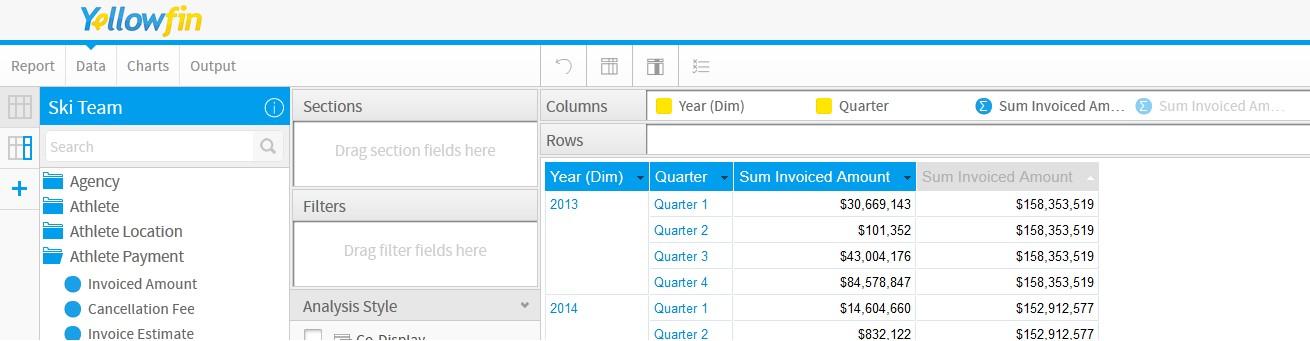
the way I would approach this report would be to use an Append Sub-Query, putting the Year, Quarter & Quarterly Total in the Master Query:

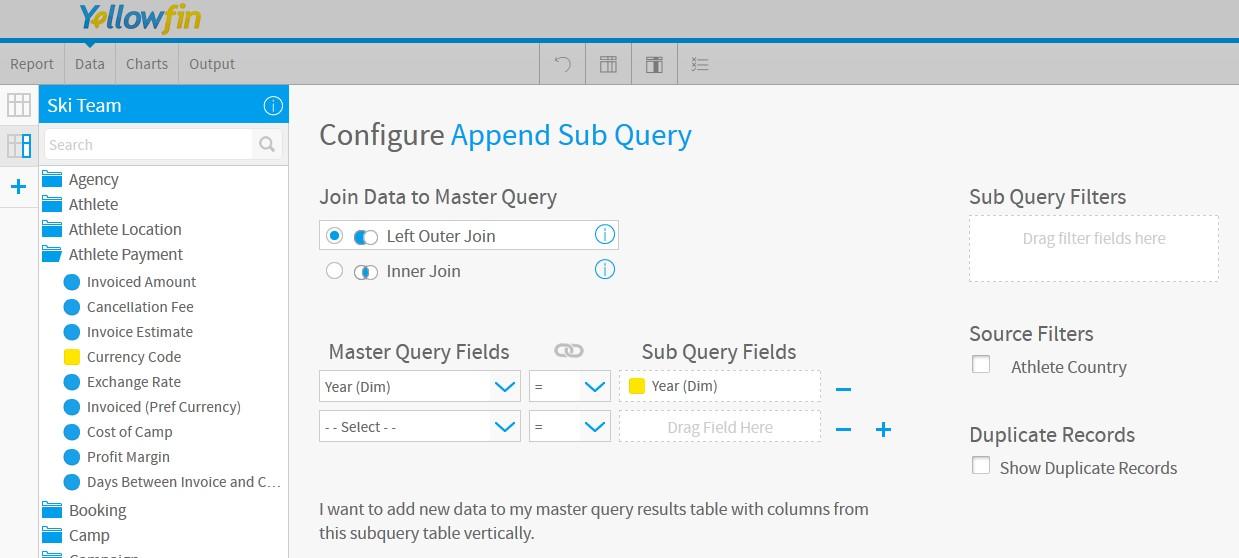
making sure to join to the Sub-Query on the Year column:
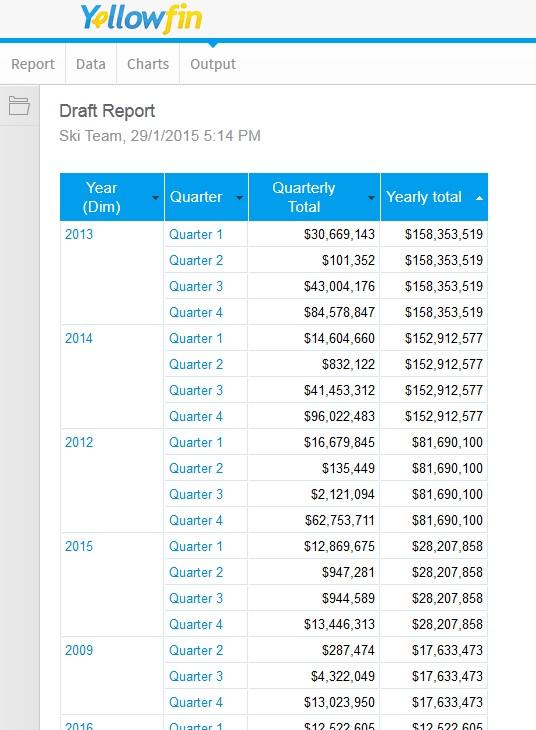
and then applying the sorting via the Column Formatting, and voila', here is the output:
I hope that fulfills your reporting requirements, if there are any further questions please let us know.
regards,
Dave
the way I would approach this report would be to use an Append Sub-Query, putting the Year, Quarter & Quarterly Total in the Master Query:
making sure to join to the Sub-Query on the Year column:
and then applying the sorting via the Column Formatting, and voila', here is the output:
I hope that fulfills your reporting requirements, if there are any further questions please let us know.
regards,
Dave