
Sensitive Data in Business Analytics: On-Prem Hosting With Analytics That Doesn’t Break User Flow
Executives sometimes seem to want two things at once. Fast answers inside operational tools, and strict control over sensitive data in business analytics. The problem is friction. Many security controls add prompts, delays, and blocked screens. Users work around them or develop “muscle memory” where they click a button without fully taking in the meaning of the text they see - or have not consciously seen. If you cast your mind back, does that seem familiar to you? Analysts export to spreadsheets, it’s often still their weapon of choice. Leaders can lose trust in the numbers when the story they tell doesn’t also support itself with credible facts. Worse still if those facts are polluted or compromised.
Security is more than just about preventing leaks of data and allowing it to fall into the wrong hands; it’s also about ensuring the integrity of the supplied data, the truths on which your BI story and analytics are built. But ensuring that surety of factual data should not interfere unduly with the consumption and use of it by making the security methods employed too onerous - and that’s the tricky part, balance and effectiveness.
The fix is not “less security.” It is security that matches user intent and risk, with controls that sit in the background most of the time. On-premises hosting helps because it keeps critical datasets, keys, and policy enforcement close to the systems of record. It also reduces third-party data exposure and vendor blast radius. When the balance is right, the security is endemic, effective, pervasive, but virtually unnoticeable.
One question matters more than the rest: how can analytics stay inside the user’s workflow while security stays strict?
Keep Analytics in the Product, Data on Premises
Embedded analytics beats “export and analyze”
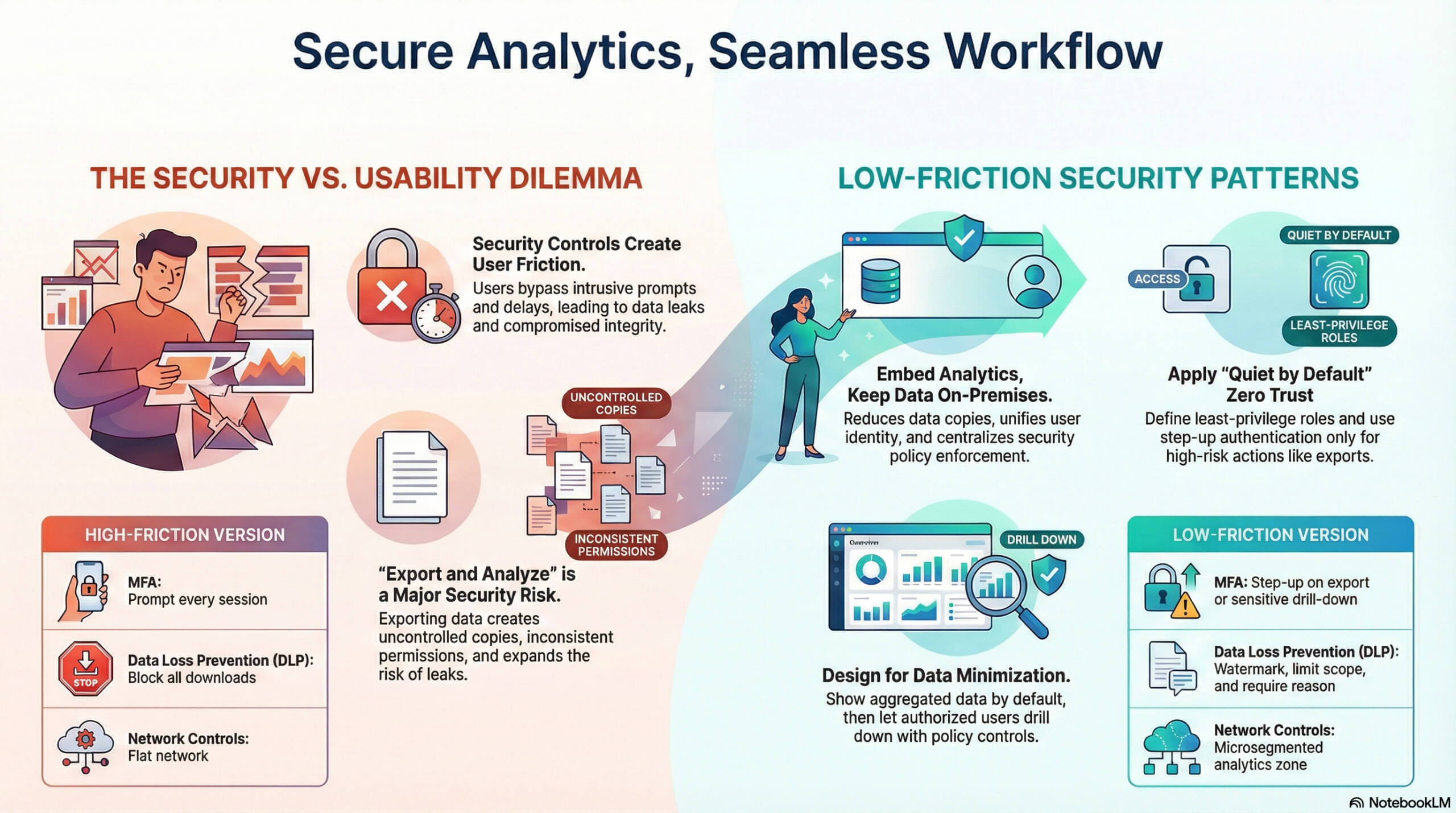
User flow breaks when analytics lives in a separate destination. Switching tools adds login prompts, different permissions, different filters, and more exports. Exports create copies, and copies create leaks.
A safer pattern is embedded analytics inside the same application where users work. That gives three concrete benefits for sensitive data in business analytics:
- Fewer data copies. Compute happens near the source, and results stream to the UI.
- Consistent identity. The same user identity controls actions and analytics.
- Policy enforcement in one place. Security rules apply to both transactions and queries.
On-premises hosting also limits what a third-party analytics provider can see. Vendor access becomes an exception, not the default. That matters because supply chain and third-party risk is a recurring theme in cyber guidance, including the 2026 predictions published by Morrison Foerster.
Design goal: invisible controls, visible accountability
Security teams often measure the strength of the control they have over the threats. Users measure interruptions to their desired outcomes or frustrations in achieving their goals. The right target is “quiet by default,” with strong evidence when something is going, or has gone, wrong. It’s not enough to have a “gut feeling” that something isn’t right.
That matches the shift toward adaptive, policy-driven data controls described in the 2026 trend discussion of unified data protection and automation from Cyberhaven.
Sensitive Data in Business Analytics: Zero Trust Without Constant Prompts
Continuous verification, least privilege, microsegmentation
Zero Trust is a fit for analytics because query access is a high-risk pathway. A single analyst can pull millions of rows faster than any app screen. Put simply, the ability to access the raw data in comprehensive ways means an expansion of potential misuses of that data, and risk to the truth of it too if unfettered ability to amend it is given without the right level of oversight.
Apply Zero Trust in ways that do not break flow:
- Least-privilege query roles. Define roles by task, not title. Separate “view KPI cards” from “export row-level detail.”
- Microsegmentation for analytics services. Isolate the query engine from operational networks. Restrict east-west traffic.
- Risk-based step-up only when needed. Do not add MFA prompts to every chart view. Trigger step-up when exporting, widening selection ranges, or accessing regulated fields.
This aligns with common Zero Trust guidance, including identity verification, least privilege, and segmentation described in Archtis’ Zero Trust insights.
UX pattern: progressive disclosure of sensitive detail
Most users do not need raw identifiers. Give them aggregates by default, then let authorized users drill down. The drill-down becomes the “control point” for step-up authorization, the requesting of justification comments, or a time-limited access grant.
This can help keep dashboards fast and reduces sensitive exposure during normal work.
Data Minimization That Still Supports Decisions
Reduce exposure surface by design
Data minimization is not a slogan. It is a design spec.
For sensitive data in business analytics, minimization looks like:
- Metric-first modeling. Precompute business metrics from sensitive sources, store only derived values where possible.
- Default to cohorts and ranges. Show bands, percentiles, and counts, then allow drill-down with controls.
- Short retention for query results. Cache aggregates for speed, but make them expire quickly and encrypt the cached data.
This maps to baseline data security principles such as limiting collection and restricting access, as summarized in Palo Alto Networks’ data security best practices and also in overviews like the Coursera data security primer.
Table: minimization choices that protect flow
| Design choice | What users see | Security win | UX win |
| Aggregate-first dashboards | KPIs, trends, alerts | Less raw data exposure | Faster load, fewer filters |
| Sensitive fields masked by default | Partial identifiers | Lowers insider risk | Fewer scary warnings |
| Drill-down gated by policy | Detail only when needed | Strong control point | Prompts happen rarely |
| Purpose-bound exports | Export with reason, scope | Better audit trail | Clearer user intent |

Sensitive Data in Business Analytics: Real-Time Classification and Sensitivity-Based Routing
Classify once, enforce everywhere
Classification fails when it depends on manual tags. Analytics pipelines ingest from many systems, and sensitivity changes with joins. Real-time classification and policy checks reduce mistakes.
A practical on-prem pattern:
- Classify fields at ingestion. Tag columns as public, internal, confidential, regulated.
- Attach tags to lineage. When datasets combine, sensitivity should follow.
- Route by sensitivity. Regulated data stays in higher-control stores and higher-control compute pools.
- Render by sensitivity. The UI uses the same tags to decide what a role can see.
This supports the move toward unified, automated protection and fast enforcement loops discussed in Cyberhaven’s 2026 trends.
UX pattern: “safe defaults” with fast exceptions
Users should not pick sensitivity levels. The product should. When exceptions are needed, use a tight flow: a small justification box, a short-lived grant, and visible logging.
Continuous Exposure Assessment for Analytics Surfaces
Test the data pathways, not just hosts
Analytics, especially third-party analytics, creates new attack surfaces: query APIs, semantic layers, cached result stores, export endpoints, and embed tokens. Exposure assessment needs to focus there.
Embedded analytics, of course, provides a much smaller exposure surface compared to external, third-party solutions. Yellowfin implements a thorough security model to protect your business data from multiple angles, including role-based access and encryption at rest and in transit.
Practical steps:
- Scan analytics APIs for broken object-level authorization.
- Test embed tokens for replay and scope abuse.
- Verify caches do not store regulated fields in plaintext.
- Validate row-level and column-level security under joins.
Table: common analytics controls and their “low-friction” form
| Control | High-friction version | Low-friction version |
| MFA | Prompt every session | Step-up on export or sensitive drill-down |
| DLP | Block all downloads | Watermark, limit scope, log, require reason |
| Network controls | Flat network | Microsegmented analytics zone |
| Logging | Manual audits | Auto evidence capture to compliance dashboards |
Encryption and Post-Quantum Planning Without Latency Surprises
Encrypt data at rest, in transit, and in the cache
On-prem does not mean “safe by location.” It means you control keys, networks, and policy. Encrypt:
- At rest in warehouses, lakehouses, and semantic stores.
- In transit for query traffic and embed connections.
- In caches where performance teams often cut corners.
Mainstream guidance consistently calls out encryption and strong protocols as core controls, including the best-practice summary from Palo Alto Networks.
For long-lived sensitive data in business analytics, start planning for post-quantum readiness. Treat it as a roadmap item tied to data retention periods and key rotation, not a sudden rebuild. Strategy discussions for 2026 often put post-quantum planning alongside broader protection programs, including the planning-oriented guidance in Hyperproof’s 2026 data protection strategies.
Behavioral Analytics That Detects Misuse Without Blocking Real Work
Baselines by role, not by user
Analysts explore. That is their job. So anomaly detection must understand role patterns.
Good signals:
- Sudden shift from aggregates to raw identifiers.
- Queries spanning unusual business units.
- Rapid pagination or export loops.
- New tools or clients hitting the query API.
Then apply responses that keep flow intact:
- Soft warnings in-product.
- Just-in-time re-auth for sensitive actions.
- Rate limits on exports, not on charts.
This matches the industry push toward context-aware controls and adaptive decisions discussed in several 2026 security trend roundups, including Cyberhaven and the broader trend framing from Tarian Group.
Audit-Ready Compliance That Does Not Create Manual Work
Make evidence automatic
Compliance work can often break flow for both users and engineers. The fix is automatic evidence capture:
- Log every sensitive field access with user, role, device, and purpose.
- Store query fingerprints, not full query text, when text could include literals.
- Record policy decisions, including denials and step-up triggers.
This supports “audit by query” instead of “audit by spreadsheet.” Compliance automation is a recurring theme in governance-focused security guidance, including the structured controls approach described in Hyperproof.
Vendor and Third-Party Risk When Data Stays on Premises
Treat vendor access as a controlled, logged workflow
Third-party analytics providers often ask for data extracts or direct connectors. That creates new copies, new credentials, and new legal exposure.
If sensitive data in business analytics must remain on premises:
- Prefer embedded analytics that run inside your boundary.
- If a vendor must connect, restrict them to a segmented network zone.
- Use short-lived credentials and scoped service accounts.
- Review API scopes and rotate keys on a fixed schedule.
Regulatory and critical infrastructure expectations increasingly point toward stronger governance and vendor scrutiny, as noted in the 2026 cyber and privacy predictions from Morrison Foerster.
A Practical Build Checklist for Analytics That Stays in Flow
Use this as an implementation pass for on-prem analytics serving sensitive data:
- Put analytics inside the operational product UI.
- Default to aggregates, gate detail with policy.
- Enforce row-level and column-level security in the query layer.
- Classify data at ingestion, carry tags through lineage.
- Encrypt storage, transit, and caches. Control keys on premises.
- Add step-up auth only for risky actions, like export.
- Run continuous exposure testing on query APIs and embed paths.
- Log policy decisions and sensitive access events automatically.
- Treat vendor access as rare, scoped, and fully logged.
On-premises hosting is not nostalgia. It is a control choice. When combined with embedded analytics and low-friction security patterns, it lets teams ship fast insights without turning sensitive data in business analytics into a constant risk tradeoff.
FAQ
How do zero trust principles apply specifically to analytics query authorization without blocking legitimate analysis?
Apply least-privilege query roles by task, isolate the analytics/query layer via microsegmentation, and use risk-based step-up only for higher-risk actions (exports, broader scopes, regulated fields), not for routine dashboard viewing.
What regulatory requirements (GDPR, HIPAA, SOX) most directly impact on-premises analytics data handling?
In practice, these most directly drive: strict access controls (row/column-level where needed), encryption at rest/in transit/in cache, minimized/default-aggregate views, controlled exports, and audit-ready evidence capture of sensitive access and policy decisions.
How can organizations validate that encryption and access controls are actually protecting sensitive analytical data?
Continuously test analytics-specific pathways: scan query APIs for authorization failures, validate row/column security under joins, verify caches aren’t storing regulated fields in plaintext, and test embed tokens for replay/scope abuse. Then corroborate with automated logging of sensitive field access and policy decisions.
What's the difference between preventing data exposure and preventing legitimate analytical workflows?
Preventing exposure is about defaulting to safe views (aggregates, masked fields) and gating sensitive drill-down/exports; preventing workflows is blanket blocking that forces users into workarounds (like exports).
How can behavioral anomaly detection distinguish between a data analyst discovering insights and an insider threat exfiltrating data?
Baseline expected behavior by role, then flag shifts such as moving from aggregates to raw identifiers, unusual business-unit scope, rapid pagination/export loops, or new clients hitting query APIs. Respond with low-friction controls (soft warnings, just-in-time re-auth, export rate limits).
What latency or query performance impact should organizations expect from adding security controls to analytics systems?
If controls are “quiet by default,” normal dashboard use stays fast (aggregate caching, minimal prompts), while extra friction is reserved for higher-risk actions like sensitive drill-down and exports (step-up auth, scoped limits, logging).
Should analytics processing happen on dedicated on-premises infrastructure, isolated from operational systems?
Yes—treat analytics as a segmented zone: isolate the query engine from operational networks, restrict east-west traffic, and route regulated data to higher-control compute pools.
How do data minimization strategies conflict with the need for comprehensive analytics datasets?
They conflict when minimization removes needed context; resolve it by designing aggregate-first models (metric-first, cohorts/ranges) and allowing controlled drill-down only when justified and authorized.
What role should third-party analytics vendors play in organizations using on-premises-only data?
Vendor access should be the exception: prefer embedded analytics inside your boundary; if a vendor must connect, constrain them to a segmented zone with short-lived, scoped credentials, strict API scope review/key rotation, and full logging.
How do organizations measure whether their analytics security is proportionate to actual business risk?
Align controls to intent and risk (step-up only for risky actions), validate real exposure points (APIs/tokens/caches/joins), and ensure “visible accountability” via automatic evidence capture rather than constant user friction.
What's the relationship between data classification accuracy and effective analytics access control?
Classification is the foundation: tag fields at ingestion, carry sensitivity through lineage/joins, and use those tags to route compute and render what each role can see. Bad tags mean broken enforcement.
How can organizations forecast and prevent analytics-related data exposure before incidents occur?
Combine continuous exposure assessment (test query APIs, tokens, caches, and join behavior) with role-based anomaly detection and automatic audit evidence, so that issues are surfaced early without disrupting legitimate analysis.