
Conversion of Data type to date
17 January, 2014
Hi,
I have faced this issue when trying to use the time series slider, I was going through the examples and noticed that in the view they have built certain dimensions like month and year with the data type as date. Can you know please let me know how it is done?
P.S: I understand that calculated fields must be used for the process but please explain in detail cause I'm not able to figure it out.
Thanks in advance.
I have faced this issue when trying to use the time series slider, I was going through the examples and noticed that in the view they have built certain dimensions like month and year with the data type as date. Can you know please let me know how it is done?
P.S: I understand that calculated fields must be used for the process but please explain in detail cause I'm not able to figure it out.
Thanks in advance.
I would like to add that I am using Yellowfin 7.
Thanks
Thanks
Hi,
To make use of Yellowfin's built-in Date Hierarchy,
you just have to drag the relevant date hierarchy field onto your Available fields, and select the date field for it to be based on.

Regards,
Stephen
To make use of Yellowfin's built-in Date Hierarchy,
you just have to drag the relevant date hierarchy field onto your Available fields, and select the date field for it to be based on.
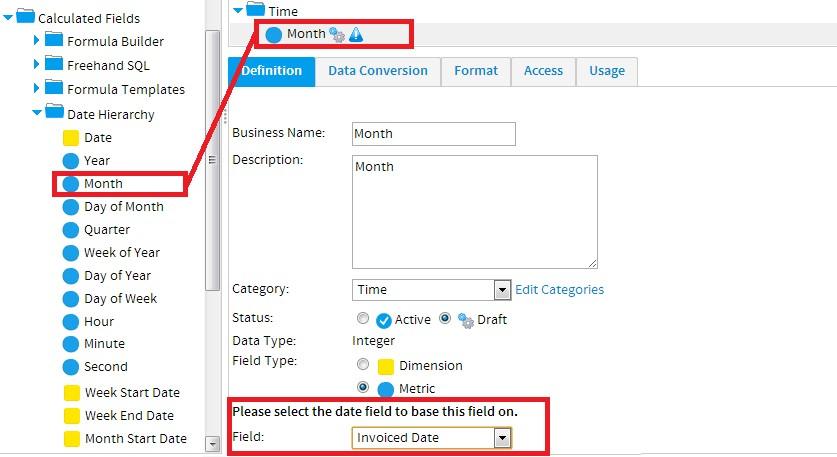
Regards,
Stephen
Hi,
I was referring to the data type being "date" instead of "Integer".
Thanks.
I was referring to the data type being "date" instead of "Integer".
Thanks.
Hello Stephen, can you help me through this please? I hope you understood my requirement. As I mentioned earlier I was referring to the data type being "date" instead of an integer in the tutorial view. Please help me through this, I would need time series analysis on my dashboards.
Please note that iam using yellowfin 7.
Thanks in advance.
Please note that iam using yellowfin 7.
Thanks in advance.
Hello Stephen, can you help me through this please? I hope you understood my requirement. As I mentioned earlier I was referring to the data type being "date" instead of an integer in the tutorial view. Please help me through this, I would need time series analysis on my dashboards.
Please note that iam using yellowfin 7.
Thanks in advance.
Please note that iam using yellowfin 7.
Thanks in advance.
Hi,
I'm sorry if i misunderstood your requirements.
The tutorial data has a date lookup table that has the Month and Year fields pre-defined.
Alternatively you can use a Calculated field as you suggested to create these fields.
SQL to extract Year and Month from a Date field and create a new Month field
(NB Note the SQL syntax is for HSQL and might not work on a different database)
Then formatted to display the Month Name
Note the data type is Date
SQL to extract Year from a Date field and create a new Year field
This should allow you to use time series as well.
Please let me know if this is what you were looking for, if not please can you explain in a little more detail and maybe include screenshot.
Regards,
Stephen
I'm sorry if i misunderstood your requirements.
The tutorial data has a date lookup table that has the Month and Year fields pre-defined.
Alternatively you can use a Calculated field as you suggested to create these fields.
SQL to extract Year and Month from a Date field and create a new Month field

(NB Note the SQL syntax is for HSQL and might not work on a different database)
Then formatted to display the Month Name

Note the data type is Date
SQL to extract Year from a Date field and create a new Year field

This should allow you to use time series as well.
Please let me know if this is what you were looking for, if not please can you explain in a little more detail and maybe include screenshot.
Regards,
Stephen
Hi Yellowfin support,
I'm having a similar issue, but on SQL Server.
I need to create a Date field to match a Date field in a subquery.
The new field has to add one month to an existing field (field called 'Period Processed' in the DW. Here the strarting field, it's a Date field:
When I create the new field as a Freehand SQL, using the type DATE, the field is created as a Varchar:
and cannot be used in the subquery:
If I force the conversion to a DATETIME, the field is created as a TImestamp, and can't be used in the subquery either:
Any idea on how can I add one month to the Date field, avoiding conversion issues?
Thanks a lot
Francesca
I'm having a similar issue, but on SQL Server.
I need to create a Date field to match a Date field in a subquery.
The new field has to add one month to an existing field (field called 'Period Processed' in the DW. Here the strarting field, it's a Date field:

When I create the new field as a Freehand SQL, using the type DATE, the field is created as a Varchar:
and cannot be used in the subquery:
If I force the conversion to a DATETIME, the field is created as a TImestamp, and can't be used in the subquery either:
Any idea on how can I add one month to the Date field, avoiding conversion issues?
Thanks a lot
Francesca