
Adding average total in a crosstab and how we can display zero values/data
5 October, 2011
Hi All,
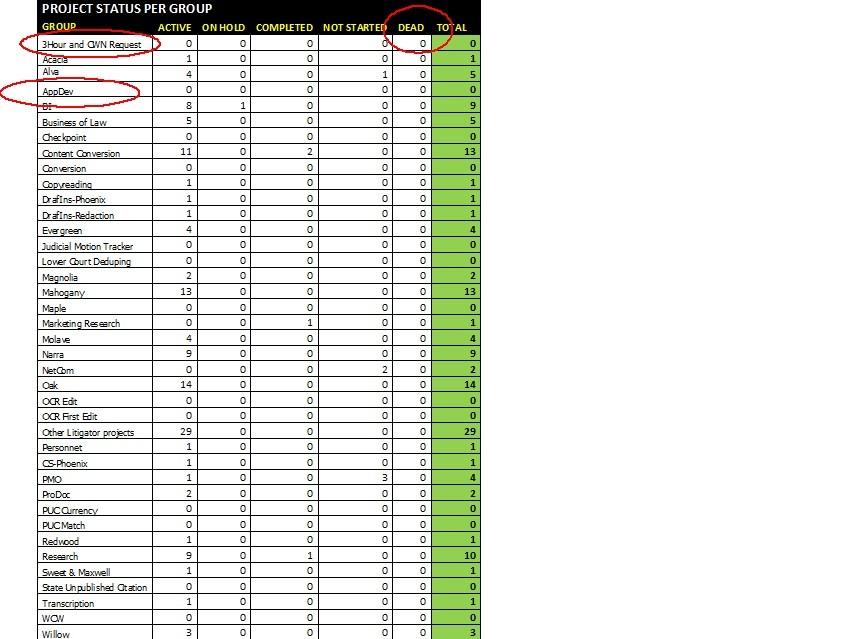
One of our client has a crosstab report where they have Column Totals and Column Average/Percentage. (please see attached image below.

But in Yellowfin it just looks like this (see image below). Is there a way where can also have or put AVERAGE or Percent?
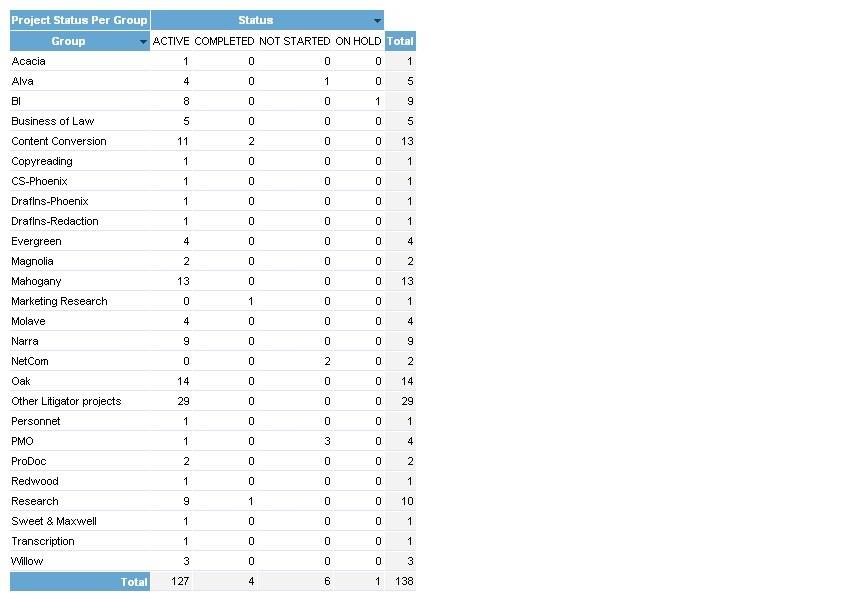
Another thing is how can I show data (or data fields) with zero values? As you can see in the table generated in excel, I have a DEAD column (with all zero values) but in the table generated in Yellowfin, it was automatically excluded from the table. Also, in the table generated in excel, I have data (such as 3 hour and CWN request, Appdev) with zero values that was also excluded in the table generated in Yellowfin. How can I resolve this problem? What I want to do is to still show data (or data fields) with zero values.
Thanks,
Albert
One of our client has a crosstab report where they have Column Totals and Column Average/Percentage. (please see attached image below.
But in Yellowfin it just looks like this (see image below). Is there a way where can also have or put AVERAGE or Percent?
Another thing is how can I show data (or data fields) with zero values? As you can see in the table generated in excel, I have a DEAD column (with all zero values) but in the table generated in Yellowfin, it was automatically excluded from the table. Also, in the table generated in excel, I have data (such as 3 hour and CWN request, Appdev) with zero values that was also excluded in the table generated in Yellowfin. How can I resolve this problem? What I want to do is to still show data (or data fields) with zero values.
Thanks,
Albert
Hi Albert,
You can display 'null' values in the report by enabled this option on the report builder page:

Unfortunately you won't be able to add a prefix to the TOTAL only, as all formatting options must be applied to the entire 'Project Status per group' column. I have created an enhancement request (TASK ID = 108079) that will allow you to have seperate formatting options for the TOTALS , so this can hopefully be included in a future update.
Regards,
David
You can display 'null' values in the report by enabled this option on the report builder page:

Unfortunately you won't be able to add a prefix to the TOTAL only, as all formatting options must be applied to the entire 'Project Status per group' column. I have created an enhancement request (TASK ID = 108079) that will allow you to have seperate formatting options for the TOTALS , so this can hopefully be included in a future update.
Regards,
David