
Date formats in views
4 February, 2013
Hi,
I'm sure this must have come up before, but I don't seem to be able to find it in the forum.
I have a range of date fields in different formats (YYYYMM, MMM, MM, MMMM YYYY, etc) and I'm trying to add these as calculated fields to a view. In the "old days" we would have pre-cooked these fields in the database and presented YF with a single view to create a YF view. Now, we're trying to put that logic in at the YF end of things.
So, I have a date field with the format 'MMM yyyy' applied to it, but when I try and produce a table grouped by this field, I get the following:
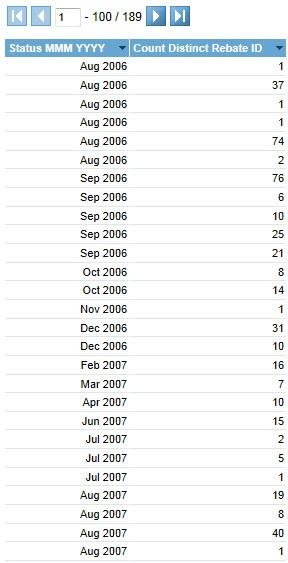
What you can see there is that there is an entry for the 'MMM yyyy' format for every instance of the date within that 'MMM yyyy'.
How would I go about grouping these up correctly so that there is a single entry for each 'MMM yyyy' - Aug 2006 should have a single line for a count of 116.
Thanks
Brendon
I'm sure this must have come up before, but I don't seem to be able to find it in the forum.
I have a range of date fields in different formats (YYYYMM, MMM, MM, MMMM YYYY, etc) and I'm trying to add these as calculated fields to a view. In the "old days" we would have pre-cooked these fields in the database and presented YF with a single view to create a YF view. Now, we're trying to put that logic in at the YF end of things.
So, I have a date field with the format 'MMM yyyy' applied to it, but when I try and produce a table grouped by this field, I get the following:
What you can see there is that there is an entry for the 'MMM yyyy' format for every instance of the date within that 'MMM yyyy'.
How would I go about grouping these up correctly so that there is a single entry for each 'MMM yyyy' - Aug 2006 should have a single line for a count of 116.
Thanks
Brendon
Hi Brendon,
I think that this forum post is about the same thing, please let us know if that's what you are talking about or not.
Regards,
Dave
I think that this forum post is about the same thing, please let us know if that's what you are talking about or not.
Regards,
Dave
Thanks David,
That looks like it will kinda do what I need it to.
Supplemental question - How can I get the formats I need? I need to get formats like 'MMM YYYY' and 'YYYYMM'. Do I need to user the custom formatter to set these up?
I've tried to create a calculated field to concatenate two fields together, but these date hierarchy fields aren't in the list of available fields to use in a calculated field.
Thanks
Brendon
That looks like it will kinda do what I need it to.
Supplemental question - How can I get the formats I need? I need to get formats like 'MMM YYYY' and 'YYYYMM'. Do I need to user the custom formatter to set these up?
I've tried to create a calculated field to concatenate two fields together, but these date hierarchy fields aren't in the list of available fields to use in a calculated field.
Thanks
Brendon
Hi Brendon,
you won't have to resort to a custom formatter, making sure that you set the format of the field to Date, then there will be a DateFormat type available called Other which will enable you to enter your own custom format:

Regards,
Dave
you won't have to resort to a custom formatter, making sure that you set the format of the field to Date, then there will be a DateFormat type available called Other which will enable you to enter your own custom format:

Regards,
Dave
Thanks David,
That's what I had done in the original post above - using the date hierarchy certainly removes the repetition in the date field, but I'd like to be able to use a date hierarchy with a different format - other than the ones provided.
Thanks
Brendon
That's what I had done in the original post above - using the date hierarchy certainly removes the repetition in the date field, but I'd like to be able to use a date hierarchy with a different format - other than the ones provided.
Thanks
Brendon
Hi Brendon,
that's the way to get the different formats such as MMM yyyy, however be aware that it only changes the way the field appears, it doesn't do any sort of data conversion in the background, and the consequence of this is that if you try grouping it won't work because even though visually the fields may look the same - behind the scenes they are different timestamps so they won't group as you may want them to.
Regards,
Dave
that's the way to get the different formats such as MMM yyyy, however be aware that it only changes the way the field appears, it doesn't do any sort of data conversion in the background, and the consequence of this is that if you try grouping it won't work because even though visually the fields may look the same - behind the scenes they are different timestamps so they won't group as you may want them to.
Regards,
Dave
Thanks Dave,
So what you're saying is that I can either use the date formatter and end up with repetition, but have the format I want, or I can use the date hierarchy and use a predefined format.
Is there no way to create a custom date hierarchy? I think the answer is probably no, but I need to ask anyway :-)
Thanks
Brendon
So what you're saying is that I can either use the date formatter and end up with repetition, but have the format I want, or I can use the date hierarchy and use a predefined format.
Is there no way to create a custom date hierarchy? I think the answer is probably no, but I need to ask anyway :-)
Thanks
Brendon
Hi Brendon,
well, creating a Freehand SQL Calculated field is like creating a custom date hierarchy don't you think?
[code]CAST( datepart(yyyy, boardingtime) AS VARCHAR(10) )+ '-' + CAST( datepart(mm, boardingtime) AS VARCHAR(10) )[/code]
To sum up, you can get custom formatting that doesn't change the underlying value which means you can't group by it due to the milli-seconds etc. being unique, or you can use the Date Hierarchy fields that actually do change the underlying value, or if the Date Hierarchy collection doesn't contain the field that you need then you'll have to create it as above.
Regards,
Dave
well, creating a Freehand SQL Calculated field is like creating a custom date hierarchy don't you think?
[code]CAST( datepart(yyyy, boardingtime) AS VARCHAR(10) )+ '-' + CAST( datepart(mm, boardingtime) AS VARCHAR(10) )[/code]
To sum up, you can get custom formatting that doesn't change the underlying value which means you can't group by it due to the milli-seconds etc. being unique, or you can use the Date Hierarchy fields that actually do change the underlying value, or if the Date Hierarchy collection doesn't contain the field that you need then you'll have to create it as above.
Regards,
Dave
Hi Dave,
What I've decided to do is to use a table in the view structure which contains all the different date formats we use - that way I can get definitive values rather than masked values.
It's not the most elegant solution, but it will give us what we need.
Thanks
Brendon
What I've decided to do is to use a table in the view structure which contains all the different date formats we use - that way I can get definitive values rather than masked values.
It's not the most elegant solution, but it will give us what we need.
Thanks
Brendon
Freehand SQL Calculated fields do not suffice as although you CAN create the data in YYYYMM or mmm YYYY format, you are unable to apply those as Label Headings in charts, nor link them to Org Ref Codes (in v6.1 anyway)
Essentially the only way around this I can see is for Yellowfin to add a new Calculated Fields > Date Hierarchy field called "YYYYMM" or something similar. And at this point, format it to YYYYMM. That way the one field will provide all solutions to what you/we are trying to do.
I have the same issue at Taupo NZ, Brendon.
We find it is impossible to do monthly trending across multiple years UNLESS we have a YYYYMM field that can be a) sorted and b) displayed nicely (e.g. 'Dec 2012' not '201212' and c) charted.
The only way to do this in Yellowfin right now, is to
1) create a (in our case) MySQL view,
2) format the date in YYYYMM format in said view,
3) then bring it through into the Yellowfin view (preformatted e.g. '201212')
4) (And then we can Org Ref Code it to change e.g. '201212' to 'Dec 2012' - this keeps it ordered nicely with nice text using ONE field only.)
Regards,
-David Fear a.k.a. Guest =P
Essentially the only way around this I can see is for Yellowfin to add a new Calculated Fields > Date Hierarchy field called "YYYYMM" or something similar. And at this point, format it to YYYYMM. That way the one field will provide all solutions to what you/we are trying to do.
I have the same issue at Taupo NZ, Brendon.
We find it is impossible to do monthly trending across multiple years UNLESS we have a YYYYMM field that can be a) sorted and b) displayed nicely (e.g. 'Dec 2012' not '201212' and c) charted.
The only way to do this in Yellowfin right now, is to
1) create a (in our case) MySQL view,
2) format the date in YYYYMM format in said view,
3) then bring it through into the Yellowfin view (preformatted e.g. '201212')
4) (And then we can Org Ref Code it to change e.g. '201212' to 'Dec 2012' - this keeps it ordered nicely with nice text using ONE field only.)
Regards,
-David Fear a.k.a. Guest =P