
Deletion via Dashboard Management
7 February, 2013
David,
I have created a couple of restricted roles to control access for our intended end users so that they cannot edit or delete dashboards and reports.
I users is a pure Read Only reporting user.
A second is a restricted administrator user role. Primarily able to change settings, import and export report definitions.
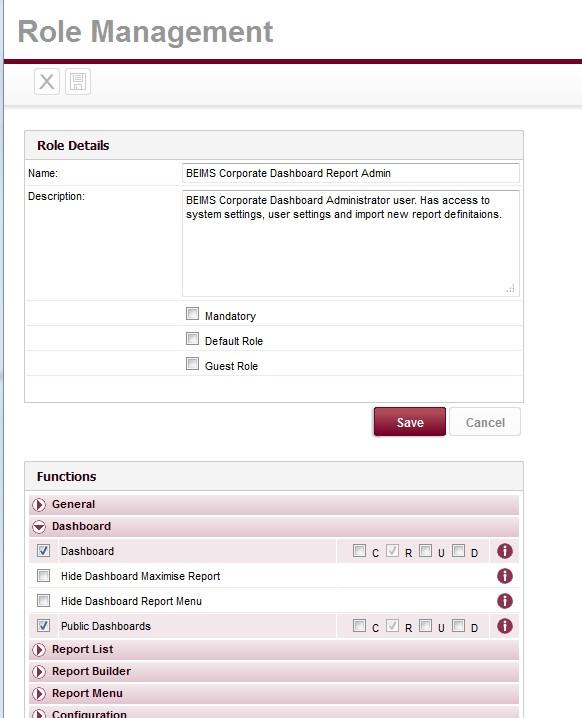
This BEIMS Corporate Dashboard Report Admin role has only Read ticked in the Dashboard, Public Dashboards sections of the Role Details. (See attached image.)
But yet with this user I was able to access Dashboard Management and delete a dashboard.
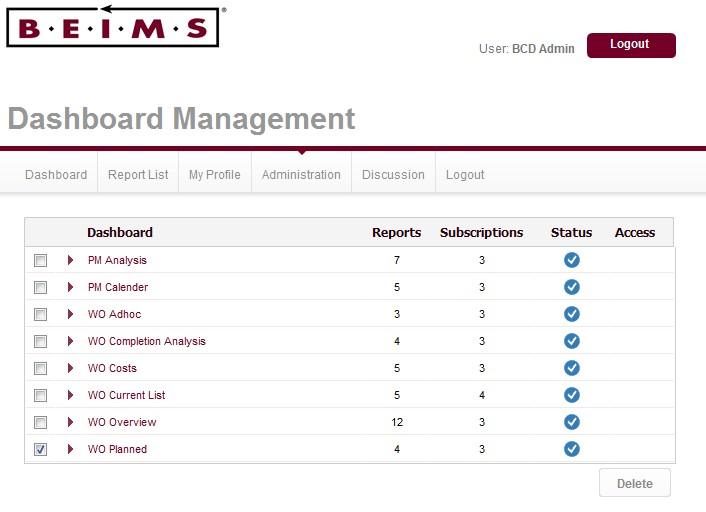
(See attached image.)
Is there a security setting I have mis-set?
Ian
I have created a couple of restricted roles to control access for our intended end users so that they cannot edit or delete dashboards and reports.
I users is a pure Read Only reporting user.
A second is a restricted administrator user role. Primarily able to change settings, import and export report definitions.
This BEIMS Corporate Dashboard Report Admin role has only Read ticked in the Dashboard, Public Dashboards sections of the Role Details. (See attached image.)
But yet with this user I was able to access Dashboard Management and delete a dashboard.
(See attached image.)
Is there a security setting I have mis-set?
Ian
Hi Ian,
No there isn't a security setting you've missed. The "Delete" in the screenshot doesn't actually delete the tab, it only removes the tab from that particular user's dashboard, i.e the tab isn't totally deleted from the repository. Perhaps a more appropriate label would be "Hide" rather than "Delete".
It is actually the "Remove" functionality that allows a user to delete the tab for all users, and a user with only "Read" (not "Delete") permission for the tab will not have the option to "Remove" the tab, they will only be able to "Delete" it.
For more information on this topic please see this forum post.
I hope that all makes sense, if there are any further questions please don't hesitate to contact us.
Regards,
Dave
No there isn't a security setting you've missed. The "Delete" in the screenshot doesn't actually delete the tab, it only removes the tab from that particular user's dashboard, i.e the tab isn't totally deleted from the repository. Perhaps a more appropriate label would be "Hide" rather than "Delete".
It is actually the "Remove" functionality that allows a user to delete the tab for all users, and a user with only "Read" (not "Delete") permission for the tab will not have the option to "Remove" the tab, they will only be able to "Delete" it.
For more information on this topic please see this forum post.
I hope that all makes sense, if there are any further questions please don't hesitate to contact us.
Regards,
Dave
David,
Thank you for your response. I agree about the dashboard delete and remove options. These seem to be working fine according to the role management options selected.
The issue is I have created a Role that has limited admin funtionality to allow our clients some admin functions but not the powerfull YF Admin role.
The attached document shows how the limited admin role I created can, from the Dashboard, Delete public dashboard tabs but not Remove dashboard tabs.
However fom the Dashboard Management page the same user can permenantly Remove dashboard tabs.
Is there a security setting I have missed or is there a minor security hole?
Please see attached pdf for details.
Regards
Ian
Thank you for your response. I agree about the dashboard delete and remove options. These seem to be working fine according to the role management options selected.
The issue is I have created a Role that has limited admin funtionality to allow our clients some admin functions but not the powerfull YF Admin role.
The attached document shows how the limited admin role I created can, from the Dashboard, Delete public dashboard tabs but not Remove dashboard tabs.
However fom the Dashboard Management page the same user can permenantly Remove dashboard tabs.
Is there a security setting I have missed or is there a minor security hole?
Please see attached pdf for details.
Regards
Ian
Hi Ian,
You will not be able to attach documents to the forum unless you are logged in.
So it didn't come through.
You have not missed anything.
Giving someone access to Dashboard Management effectively gives them full access to dashboards.
If you want to make sure they do not fully delete dashboards you need to make sure they cannot access dashboard management.
Unfortunately there is no way around this at this point in time, though something to consider for future dashboard management enhancements.
Please let me know if there was anything else you were after.
Regards,
David
You will not be able to attach documents to the forum unless you are logged in.
So it didn't come through.
You have not missed anything.
Giving someone access to Dashboard Management effectively gives them full access to dashboards.
If you want to make sure they do not fully delete dashboards you need to make sure they cannot access dashboard management.
Unfortunately there is no way around this at this point in time, though something to consider for future dashboard management enhancements.
Please let me know if there was anything else you were after.
Regards,
David
David,
I cannot identify which role configuration setting prevents access to the Dashboard Management form.
Please advise.
Ian
I cannot identify which role configuration setting prevents access to the Dashboard Management form.
Please advise.
Ian
Hi Ian,
sorry Ian, my mistake, there isn't actually such a setting, I got a little mixed up - hope you didn't spend a lot of time of looking!
I have created an enhancement request for the ability to have a Dashboard Management setting for Dashboard Management, its task ID is 125500. It is too late to get it onto the YF 6.3 roadmap, so will try later in the year to get it onto the 6.4 list.
Regards,
Dave
sorry Ian, my mistake, there isn't actually such a setting, I got a little mixed up - hope you didn't spend a lot of time of looking!
I have created an enhancement request for the ability to have a Dashboard Management setting for Dashboard Management, its task ID is 125500. It is too late to get it onto the YF 6.3 roadmap, so will try later in the year to get it onto the 6.4 list.
Regards,
Dave