
Drill down Hierarchy report on dashboard
17 March, 2014
Have found when drilling down on a portlet on a hierarchy field and then change the parameter without going to the top of the hierarchy the portlet does not refresh with the new parameter value. The other portlets on the dashboard do ok.
Hi Ross,
Could you please tell us what version and build of Yellowfin you are using. I have tried to reproduce this issue on the Feb build of YF 7 and don't seem to be able to. Maybe I have misinterpreted the scenario you have described, here is what I have, please have a look and if it's not what you have then please attach some screenshots so there is no misunderstanding:
1) the left portlet has the drill-down hierarchy
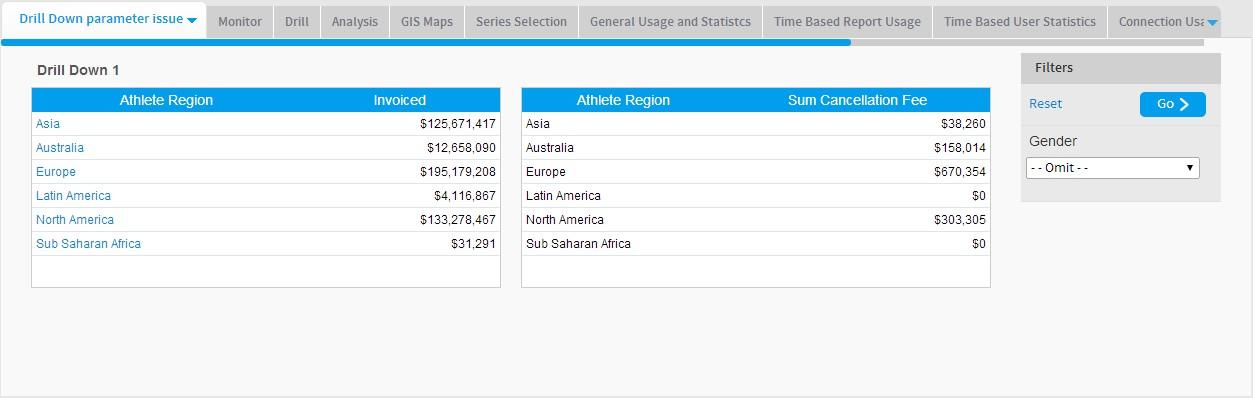
2) drilled down on the Asia region

3) Changed Gender to Female, both portals refreshed
regards,
Dave
Could you please tell us what version and build of Yellowfin you are using. I have tried to reproduce this issue on the Feb build of YF 7 and don't seem to be able to. Maybe I have misinterpreted the scenario you have described, here is what I have, please have a look and if it's not what you have then please attach some screenshots so there is no misunderstanding:
1) the left portlet has the drill-down hierarchy
2) drilled down on the Asia region

3) Changed Gender to Female, both portals refreshed

regards,
Dave
Using YF 7 February update.
The Personal information portlet is the primary portlet in the analytical connections for the portlets on the dashboard.
1. First select parameter value and drill down hierarchy to lowest level

2. Leave report at lowest level in hierarchy.
3. Select new parameter value
Notice primary portlet has updated and related portlet is trying to use previous parameter value.
sorry Ross, but a few of us have looked at this over here and still don't really understand your setup, so could you please add some more screenshots, for example some from the Analytic Setup like below:
and any others that you feel might help us better understand how your reports and dashboard are set up.
thanks,
Dave


and any others that you feel might help us better understand how your reports and dashboard are set up.
thanks,
Dave
See attached screenshots.


Thanks Ross,
It's almost all the info I need, as I cannot see how many reports are on your dashboard, and which filters are showing from where :(.
But I think I may know where you're running into issues.
You have linked the report to the filter, but not the drill-down field.
This means whatever the drill-down does does not affect the other report as it's simply not linked and aware of any relationship.
You would need to link the relevant filter to the drill-down field.
But in saying this, I could be missing something as I do not have the complete picture of how your dashboard is setup.
Please let me know if this helps, or provide the more info so I can look at it further.
Thanks,
David
It's almost all the info I need, as I cannot see how many reports are on your dashboard, and which filters are showing from where :(.
But I think I may know where you're running into issues.
You have linked the report to the filter, but not the drill-down field.
This means whatever the drill-down does does not affect the other report as it's simply not linked and aware of any relationship.
You would need to link the relevant filter to the drill-down field.
But in saying this, I could be missing something as I do not have the complete picture of how your dashboard is setup.
Please let me know if this helps, or provide the more info so I can look at it further.
Thanks,
David