
How does Client Organisation Logo work?
8 August, 2013
Overview: This feature allows a default logo for each Client Organisation to be available for a report's header/footer when exporting to pdf, doc etc.
Steps to set up this feature:
1) Make sure your image file has the same name as a client organisation's Client Reference ID, in this example ClientOrg1 has Client Reference ID = 1, so the image file for this particular Client Org is called 1.png
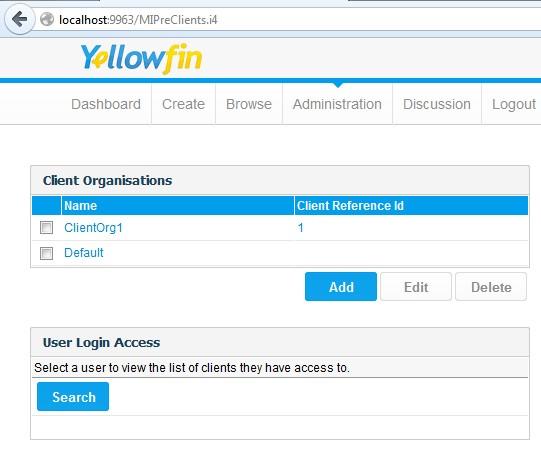
2) In this example the image file is placed in the ROOT folder

3) in Administration->Configuration->System Parameters there is a field called Client Organisation Logo which should be configured to have the absolute address of the image file with a ## replacing the file name. (Yellowfin will replace the ## by the current Client Org's Client Reference ID)

4) Then when setting up a header/footer for a report, as well as the usual drop-down list of image files, the default company logo will now be available for inserting
Steps to set up this feature:
1) Make sure your image file has the same name as a client organisation's Client Reference ID, in this example ClientOrg1 has Client Reference ID = 1, so the image file for this particular Client Org is called 1.png
2) In this example the image file is placed in the ROOT folder
3) in Administration->Configuration->System Parameters there is a field called Client Organisation Logo which should be configured to have the absolute address of the image file with a ## replacing the file name. (Yellowfin will replace the ## by the current Client Org's Client Reference ID)

4) Then when setting up a header/footer for a report, as well as the usual drop-down list of image files, the default company logo will now be available for inserting
