
How to add filters to the dashboard??
21 October, 2013
Hi,
I want to create two filters named "past 7 days" and "past 1 month"
with my Date field..I tried using 'between' command and selected date ranges for past 7 days and past 1 month, but when i look into my analytic setup in my report it is showing "no filters found" in Filter display.Also, is there anyway to change my current date scenario? I need the past 7 days and other one as filters to the whole dashboard. I have applied them as filters to the reports in them and still facing the same issue. Any suggestions?
Thanks in advance.
I want to create two filters named "past 7 days" and "past 1 month"
with my Date field..I tried using 'between' command and selected date ranges for past 7 days and past 1 month, but when i look into my analytic setup in my report it is showing "no filters found" in Filter display.Also, is there anyway to change my current date scenario? I need the past 7 days and other one as filters to the whole dashboard. I have applied them as filters to the reports in them and still facing the same issue. Any suggestions?
Thanks in advance.
Hi
In order for your filters to display in the Filter Display section of your Dashboard, you need to change it at report level to User Prompt.
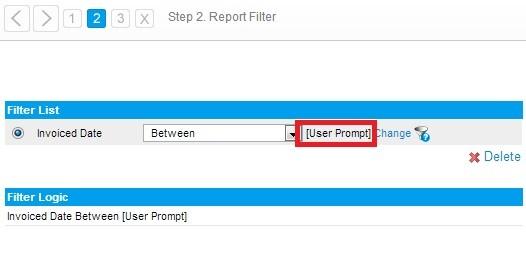
You can still use the Predefined Date Periods by changing the Entry Style to Drop-Down and selecting Pre-defined date ranges.

You could also select a default value (e.g. "Last 7 days")
This should then display the filter in the Filter Display of your Tab
Please let me know if this is what you were looking at doing?
For more information regarding Link filters you can check this wiki link
Regards,
Stephen
In order for your filters to display in the Filter Display section of your Dashboard, you need to change it at report level to User Prompt.
You can still use the Predefined Date Periods by changing the Entry Style to Drop-Down and selecting Pre-defined date ranges.

You could also select a default value (e.g. "Last 7 days")
This should then display the filter in the Filter Display of your Tab
Please let me know if this is what you were looking at doing?
For more information regarding Link filters you can check this wiki link
Regards,
Stephen
I tried it as well, When i select "user prompt" i don't get the drill down option in the entry style. Also am looking for filters which apply both for reports and on dashboard level. I hope you understand my problem.
I am attaching the screen shots of my issue. Thanks
Hi,
Unfortunately we don't see a screenshot attached to your last comment.
Out of curiosity, what database are you using, and what is the data type of your field detected in the Yellowfin view?
You can see this at step 2 of the view build, and double-clicking on the field.
E.g. View Fields
Thanks,
David
Unfortunately we don't see a screenshot attached to your last comment.
Out of curiosity, what database are you using, and what is the data type of your field detected in the Yellowfin view?
You can see this at step 2 of the view build, and double-clicking on the field.
E.g. View Fields
Thanks,
David
my data type being Date and i use an MSSQL database.
Hi,
what could be the cause of the missing Drop Down option for your filter formatting is that your date is Metric and not Dimension. as explained in this wiki page on Filter Formatting. If this is the reason then simply edit the field type and change it from Metric to Dimension.
Please let us know whether this has helped your report or not.
Regards,
Dave
what could be the cause of the missing Drop Down option for your filter formatting is that your date is Metric and not Dimension. as explained in this wiki page on Filter Formatting. If this is the reason then simply edit the field type and change it from Metric to Dimension.
Please let us know whether this has helped your report or not.
Regards,
Dave
Hi,
Thanks a lot,it worked. I have my data upto 30/092013 .Is it possible to get data for the past 30 days(1/9/2013 to 30/9/2013)?? I am using last one month predefined filter,but it is showing data for last 30 days using current date..
Is it possible to change the current date??
Thanks a lot,it worked. I have my data upto 30/092013 .Is it possible to get data for the past 30 days(1/9/2013 to 30/9/2013)?? I am using last one month predefined filter,but it is showing data for last 30 days using current date..
Is it possible to change the current date??
Hi,
if you use the Link To Filter option then you can choose to have the lower limit of a date range to be set to 30 days less than a user prompt date. In other words, whatever date the user picks then the previous 30 days will be shown. Here is a screen shot to illustrate how to set his up:
If I have misunderstood you, or you need further explanation then please let us know.
Regards,
Dave
if you use the Link To Filter option then you can choose to have the lower limit of a date range to be set to 30 days less than a user prompt date. In other words, whatever date the user picks then the previous 30 days will be shown. Here is a screen shot to illustrate how to set his up:

If I have misunderstood you, or you need further explanation then please let us know.
Regards,
Dave
Hi,
i just want the data for last 30 days as i mentioned before after clicking on 'past 30 days' filter.. I don't want to give the date in user prompt.
i just want the data for last 30 days as i mentioned before after clicking on 'past 30 days' filter.. I don't want to give the date in user prompt.
Hi
It is not currently possible to create your own pre-defined date ranges within Yellowfin (eg. 'Past 30 days', 'Past 1 year', etc.).
However to achieve what you are trying to do you can do the following:
1. Create 2 filter fields,
The first date filter will be set user-prompt because the start date changes.
The second date filter is set to '8/31/2013' because the end date doesn't change.
2. Filter Setup.
Change Display to Mandatory
Change Entry Style to Drop-Down and Custom-Query and select Edit Query
Select the 2 options for the start date (eg '8/1/2013', '8/31/2012') and save
Refresh and choose you default value (eg '8/1/2013')
3.In your Report and dashboard you will now have your 2 options
'01/08/2013' (Past 30 days), and
'31/08/2012' (Past 1 year)
Hope that answers your question
Regards,
Stephen
It is not currently possible to create your own pre-defined date ranges within Yellowfin (eg. 'Past 30 days', 'Past 1 year', etc.).
However to achieve what you are trying to do you can do the following:
1. Create 2 filter fields,
The first date filter will be set user-prompt because the start date changes.
The second date filter is set to '8/31/2013' because the end date doesn't change.

2. Filter Setup.
Change Display to Mandatory
Change Entry Style to Drop-Down and Custom-Query and select Edit Query
Select the 2 options for the start date (eg '8/1/2013', '8/31/2012') and save
Refresh and choose you default value (eg '8/1/2013')

3.In your Report and dashboard you will now have your 2 options
'01/08/2013' (Past 30 days), and
'31/08/2012' (Past 1 year)

Hope that answers your question
Regards,
Stephen