
How to remove thousand separator from report filter drop down list
17 April, 2012
Hi,
I want to remove the thousand separator (,) from the drop down list of "Year" filter from my report.
Below is the screenshot of "Year" input filter.
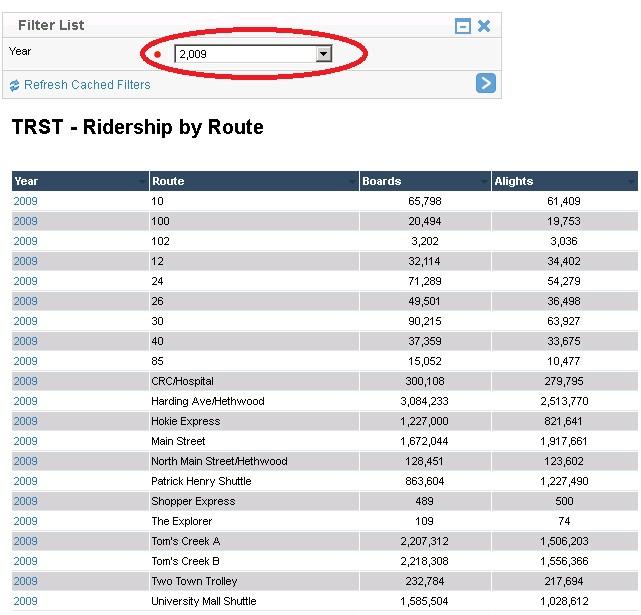
So is there any way to remove that thousand separator ?
Thanks,
Gaurav
I want to remove the thousand separator (,) from the drop down list of "Year" filter from my report.
Below is the screenshot of "Year" input filter.
So is there any way to remove that thousand separator ?
Thanks,
Gaurav
Hi Guarav,
To remove the thousand separator:
1) go to your view
2) put it in an edit mode
3) go to step 2 in a view builder
4) find your 'year' dimention among avaliable fields on your right
5) double click
6) choose a 'format' tab
7) click 'No' radio button for the thousand separator
8) save and activate your view

Regards,
Jenny.
To remove the thousand separator:
1) go to your view
2) put it in an edit mode
3) go to step 2 in a view builder
4) find your 'year' dimention among avaliable fields on your right
5) double click
6) choose a 'format' tab
7) click 'No' radio button for the thousand separator
8) save and activate your view

Regards,
Jenny.
Hi Jenny,
We are encountering similar problem with the YEAR field where thousand separator shows up. We did follow the steps mentioned in your response and updated the view. Problem persists and when we run the report, filter value continues to show up with thousand separator. Any solution for this?
We are on Yellowfin 7.1
Regards,
Kishore
We are encountering similar problem with the YEAR field where thousand separator shows up. We did follow the steps mentioned in your response and updated the view. Problem persists and when we run the report, filter value continues to show up with thousand separator. Any solution for this?
We are on Yellowfin 7.1
Regards,
Kishore