
How to share Private Reports
6 December, 2012
In Yellowfin 6.1 (August release) and above we now give the ability to share private reports with other users.
This is easily done in just a few steps;
[size="18">Step 1.[/size]
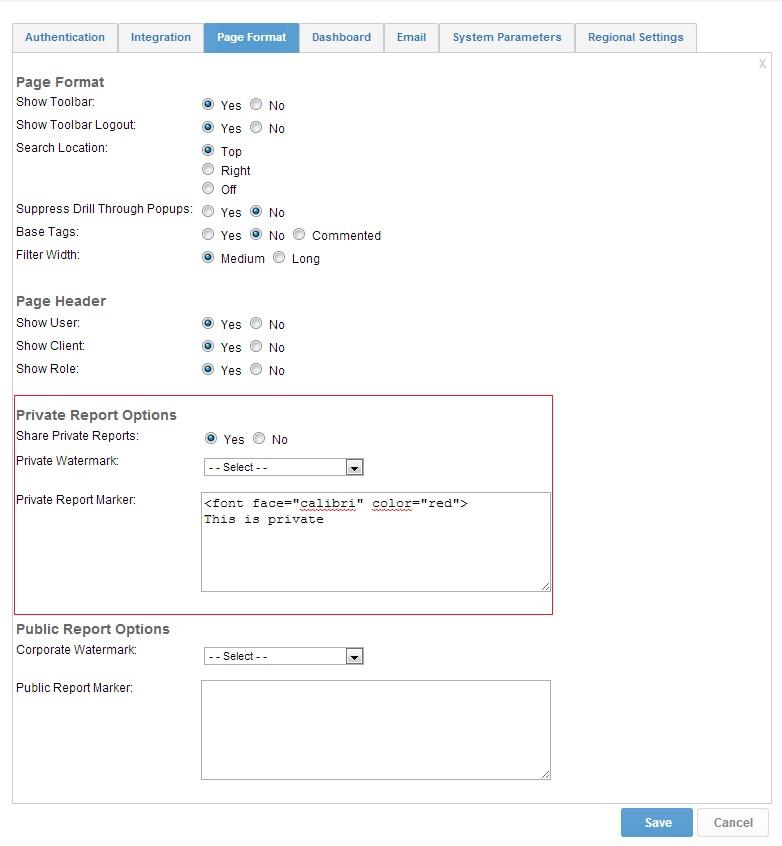
Open the configuration menu(under administration) and enable Share Private Reports from the 'Page Format' TAB.
[size="18">Step 2.[/size]
You can choose to display a 'watermark' , or a 'report marker' , which will help identify when you are view a private report.
When entering a 'Private Report Marker' HTML tags are supported, so you can specify the font type, color, size etc...
[size="18">Step 3.[/size]
Save and close the configuration TAB.
You can now share private reports by giving individuals access.
In order for you to do this, open a private report and click on the Access icon.

You can now select the users who you wish to give access.
You can also specify if that user should have read or edit
