
How to use the Client Reference ID as an access filter
10 October, 2012
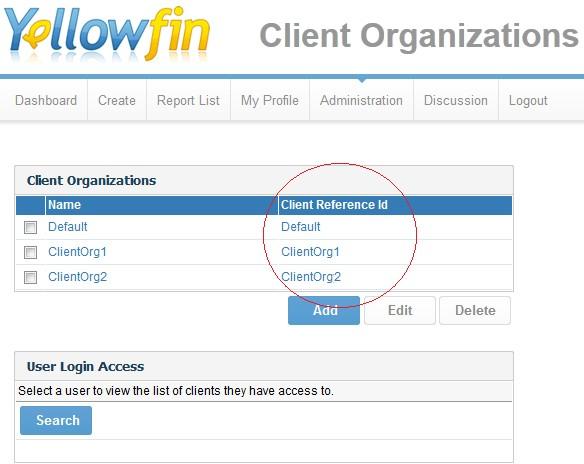
The Client Reference ID filter is just like a regular access filter except that it uses the Client Organisation�s internal name �Client Reference ID� rather than a Username as the filter value:
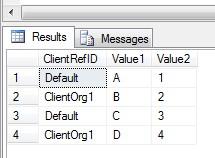
To demonstrate how to make use of it, here is a table that ties each row to a Client Reference ID:
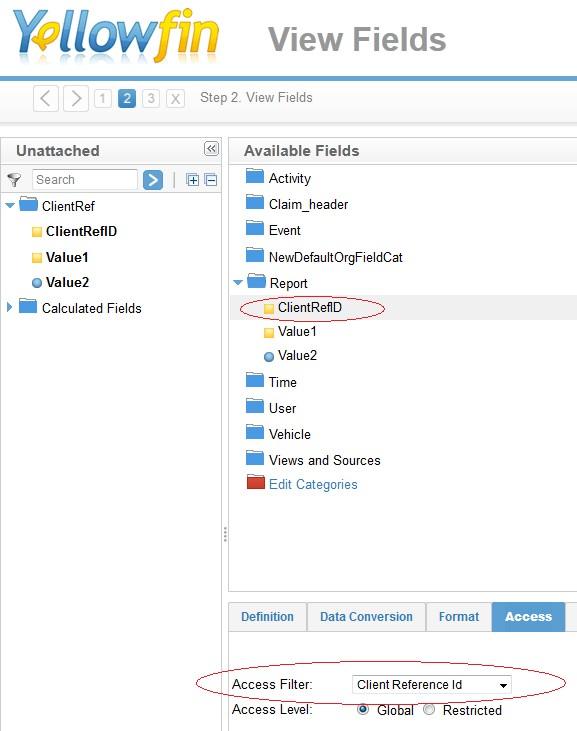
When you create a view to make use of the Client Reference ID as an access filter, make sure you select the Client Reference ID filter for whatever column you are storing your IDs in (just as is done with the regular access filter):
Then, just like regular access filters you have the option of setting it to be default at the View level, or leaving the option of turning it on at the Report level.

So, in this example if I log into the Default Client Organisation and run a report that uses the above view, the data that I see is filtered to only the rows corresponding to the Default client reference ID:
Related Posts:
- Setting up a new source filter with the Ski-Team DB
- Source/Access Filters Guide
- Setting up a source/access filter on the data source
- Applying the source/access filter to a view
To demonstrate how to make use of it, here is a table that ties each row to a Client Reference ID:
When you create a view to make use of the Client Reference ID as an access filter, make sure you select the Client Reference ID filter for whatever column you are storing your IDs in (just as is done with the regular access filter):
Then, just like regular access filters you have the option of setting it to be default at the View level, or leaving the option of turning it on at the Report level.


So, in this example if I log into the Default Client Organisation and run a report that uses the above view, the data that I see is filtered to only the rows corresponding to the Default client reference ID:

Related Posts:
- Setting up a new source filter with the Ski-Team DB
- Source/Access Filters Guide
- Setting up a source/access filter on the data source
- Applying the source/access filter to a view