
Missing “LIKE” operator in calculated field
21 July, 2014
Hi all,
I have a field which contains product codes. I want to use a case statement to group them up, since a bunch of products have "100" in the product code and should be grouped as a 100 product and so on for 90, 85, 75, etc.
In the simple formula type there is no LIKE operator.
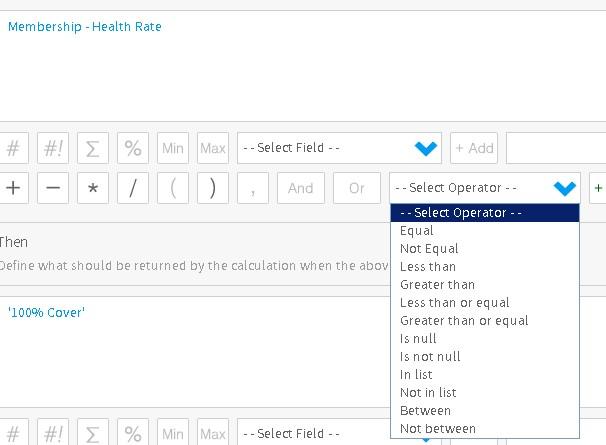
Any thoughts?
Thanks in advance, Clinton
I have a field which contains product codes. I want to use a case statement to group them up, since a bunch of products have "100" in the product code and should be grouped as a 100 product and so on for 90, 85, 75, etc.
In the simple formula type there is no LIKE operator.
Any thoughts?
Thanks in advance, Clinton
Hi Clinton,
if the datatype of the field in the database table is an integer, float etc. then you won't get the LIKE operator, the LIKE operator is for fields that are varchar datatypes in the database. It sounds to me like the Product Code field is integer.
However, for the requirement of your report I think you'll be able to use the Yellowfin Grouping feature as explained in this wiki page.
Please give that a try and let us know how you get on.
regards,
Dave
if the datatype of the field in the database table is an integer, float etc. then you won't get the LIKE operator, the LIKE operator is for fields that are varchar datatypes in the database. It sounds to me like the Product Code field is integer.
However, for the requirement of your report I think you'll be able to use the Yellowfin Grouping feature as explained in this wiki page.
Please give that a try and let us know how you get on.
regards,
Dave
Thanks for link David, I'll check that out and see how I go.
Clinton
Clinton