

Embedded Analytics in Regulated Industries - Healthcare and Finance
A dashboard inside an EHR, claims tool, or finance portal is not just reporting. It sits inside a decision path. That changes the bar. With embedded analytics in regulated industries, teams need access control, audit logs, clear metric logic, and a user experience that fits the workflow. Speed matters. So does usability. But compliance-by-design cannot sit after the fact. It has to be built in from the start.
What this article will cover
This article looks at three pressure points. First, HIPAA-compliant embedded analytics in healthcare and EHR-like settings. Second, embedded analytics in finance with SOX-ready auditability. Third, multi-tenant analytics security for SaaS products that serve many customer groups. It also shows why YellowfinBI fits teams that need white-labeled embedded analytics, fast rollout, and controlled deployment options, including on-prem embedded BI and private cloud analytics deployment.
Why regulated industries need embedded analytics with natural language interaction
Static dashboards often slow people down. Natural language query changes that. Clinicians, analysts, and finance leaders can ask questions in plain language, without SQL or a ticket to data teams. That matters when decisions happen fast. Yellowfin's Ask Yellowfin and the AI features in Yellowfin 9.17 support conversational chart creation and follow-up questions that keep context intact. In regulated settings, fewer handoffs mean fewer delays and fewer gaps between question and answer.
Business value for decision-makers and analysts
For business users, NLQ cuts dependence on technical staff. For executives, it shortens decision cycles and keeps risk, outcomes, and performance visible. For product teams, analytics stops being a cost line and starts acting like a product feature that customers use every day. That is why the latest Yellowfin release and its AI chatbot tools matter. They help teams move from static reporting to direct interaction, while keeping governance in place.
Compliance challenges: Healthcare: HIPAA, PHI, and EHR integration concerns
Healthcare teams deal with patient data, role limits, and workflow pressure. HIPAA rules expect the minimum necessary access, role-based permissions, audit logs, patient data segregation, and careful handling of PHI. The HHS HIPAA Security Rule sets the standard. White-labeling alone does not solve that. A clean UI still fails if the wrong person can see the wrong chart, or if audit trails are weak. Embedded analytics in healthcare has to fit clinician workflows and respect access boundaries at every step.
Compliance challenges: Finance: SOX, access controls, and audit-ready dashboards
Finance teams face a different set of controls. Dashboards must support controlled change management, traceable metric definitions, versioned reporting, and permissioned access to sensitive financial data. That is where SOX concerns show up. Reporting needs to be reproducible. Approvals matter. Definitions must stay consistent across periods. Public guidance from the SEC and audit standards from the PCAOB both point to the same need: trust in reported numbers depends on traceability and internal controls.
Table - Compliance requirements by regulated use case
Use-case comparison table
| Regulated context | Key risk | What embedded analytics must support | Yellowfin-aligned capability |
| Healthcare EHR / clinical ops | PHI exposure | HIPAA-oriented access control, auditability, protected embedding | White-labeling, governed access, controlled embedding |
| Finance / controllership | SOX reporting integrity | Traceable metrics, approval workflows, reproducible reports | Trusted dashboards, governed analytics |
| Multi-tenant SaaS | Cross-customer data leakage | Tenant isolation, scalable security, role-based access | Flexible deployment, customer-facing analytics |
| Public sector / regulated services | Policy compliance | Fine-grained permissions, on-prem/private cloud options | On-prem or private cloud deployment |
The pattern is simple. The more regulated the use case, the more analytics needs controls, not just charts.
How Yellowfin supports compliance-by-design in embedded analytics
Yellowfin gives product and platform teams a few practical ways to embed analytics. The lightweight JavaScript API fits apps that want tighter control. Secure iframes work when teams want cleaner isolation. White-labeling helps analytics feel native inside the host product. And deployment choices matter too. Some teams need on-prem embedded BI. Others need private cloud analytics deployment because public cloud defaults do not fit procurement or policy rules. That flexibility matters when identity boundaries and customer data separation are non-negotiable.
Governance, explainability, and audit readiness
Governance is where many analytics projects fall apart. Teams need consistent metric logic, controlled access, and trails that show who saw what and when. Yellowfin helps here with Assisted Insights and "Tell Me About My Data," which adds context to charts. Signals can watch thresholds and flag shifts in real time. Stories let teams package charts and commentary into a versioned narrative that others can review later. That mix matters for regulated analytics. It gives users context, and it gives compliance teams a record.
Scalability for multi-tenant regulated apps: what to design for
Multi-tenant apps need hard lines between customers. That means separate users, separate data, separate content definitions, and separate audit logs. SSO helps with identity. RBAC keeps access clean. Tenant-aware access patterns stop one customer from seeing another customer's data or dashboard logic. This is why regulated embedding should not create a custom BI stack for every client. That path gets messy fast. It raises costs, slows releases, and makes audits harder.
Operational scaling without sacrificing compliance
Scaling also means handling lifecycle tasks well. Provisioning and deprovisioning users should be quick and repeatable. Dashboards should be embeddable per tenant without custom rebuilds. Feature access should vary by customer contract and policy. Usage monitoring should flag odd behavior. Yellowfin's embedded model supports large user bases and gives product teams a single governed system to manage. The rule of thumb is simple: compliance-by-design scales best when analytics is embedded once and governed centrally.
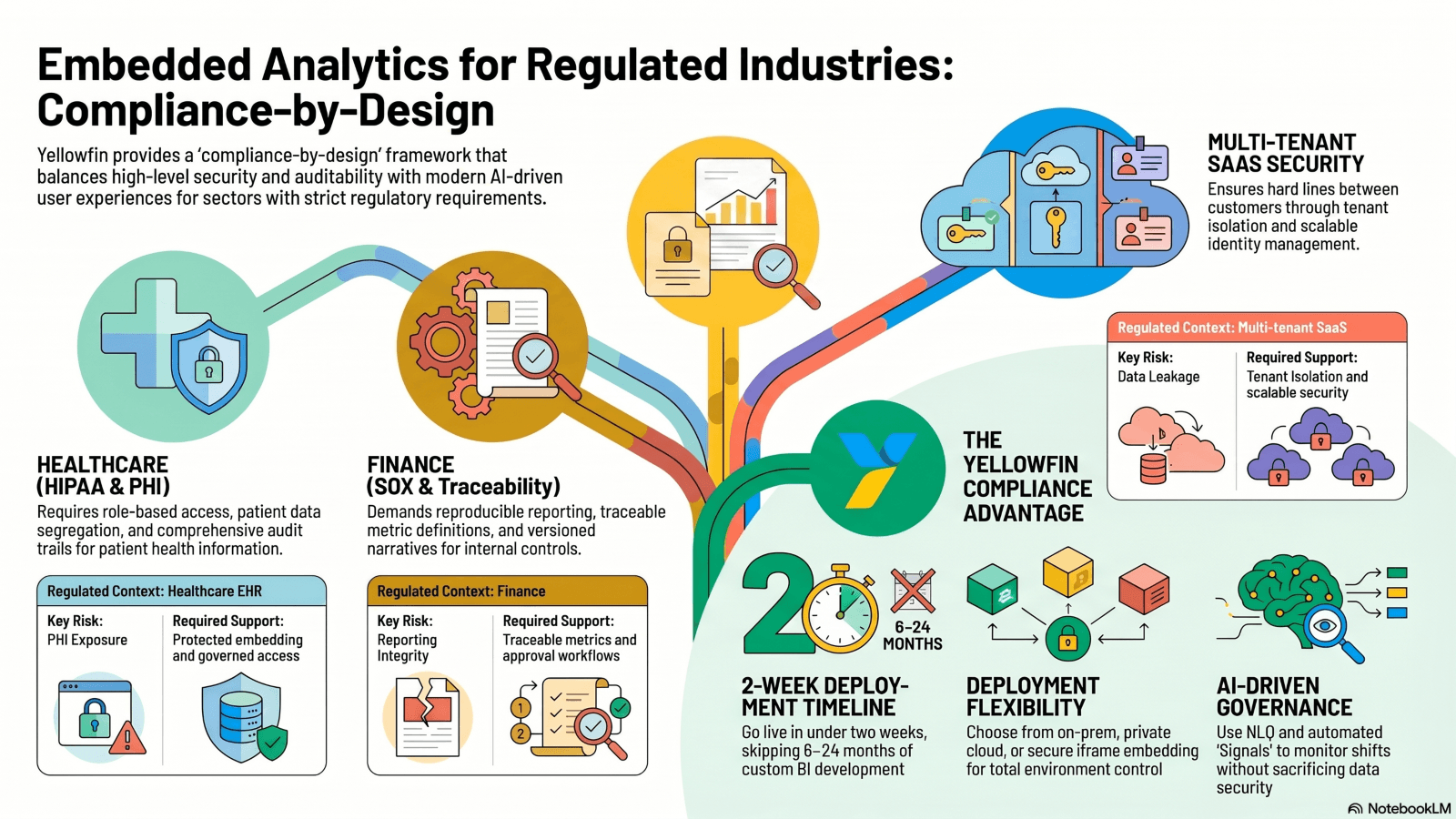
Table - Recommended architecture for regulated embedded analytics
Architecture summary table
| Layer | Recommended practice | Why it matters |
| Identity | SSO + role-based access | Prevent unauthorized access |
| Data access | Row-level / tenant-level security | Protect PHI and financial data |
| Embedding layer | Secure iframe or JS API | Control how analytics is delivered |
| Deployment | On-prem or private cloud where required | Meets stricter regulatory and procurement needs |
| Audit | Logging and report traceability | Supports investigations and compliance reviews |
| UX | White-labeled, native-feeling interface | Improves adoption without adding risk |
This is the shape of a safe embedded analytics stack. It is not flashy. It is practical.
Real-World Scenarios: Healthcare EHR analytics example
Picture a hospital network that embeds operational and patient-flow dashboards into an internal clinical app. Nurses and physicians ask plain-language questions like, "Which units saw the longest discharge delays this week?" They drill into trends without leaving the workflow. Alerts show unusual spikes in bed occupancy or wait times. Access stays limited by role. That reduces friction and improves adoption, while PHI stays behind the right controls.
Real-World Scenarios: Finance dashboard example
Now picture a controllership portal. The finance team embeds executive reporting, variance views, and close-status dashboards. Leaders ask follow-up questions in plain language to inspect budget drift or revenue gaps. Audit controls preserve trust because metric definitions stay fixed and report history stays traceable. Conversational analytics shortens time to answer, without loosening governance.
Why Yellowfin is a strong fit for regulated embedded analytics teams
Yellowfin fits teams that need white-labeled embedded analytics, protected deployment choices, AI NLQ, Assisted Insights, Signals, and Stories. It also fits teams that do not want to build BI from scratch. That matters in regulated settings, where the hard part is not the chart. The hard part is everything around the chart: identity, access, versioning, and traceability.
How to position Yellowfin internally
For executives, the message is speed with lower risk. For analysts, it is less manual reporting and more self-service. For product teams, it is better adoption and a cleaner path to monetized analytics. For compliance teams, it is stronger control and easier review. Yellowfin gives each group something concrete to work with.
Conclusion - Embed analytics where decisions happen, without compromising trust
In regulated industries, embedded analytics must be governed, auditable, and ready to scale. Natural language interaction improves adoption, but compliance-by-design makes that adoption safe. Healthcare and finance both need more control than generic BI setups usually offer. Multi-tenant apps do too. The right stack keeps data separated, metrics consistent, and workflows fast.
Next Steps
Review the latest AI features in Yellowfin 9.17, including Ask Yellowfin and Code Assistant. Download The Power BI Alternative: Yellowfin Migration Guide. Register for the webinar, "The Analytics Coffee Club - Learn the Lingo". Then book a demo and test Yellowfin for secure embedded analytics in regulated environments.