
How do I use historical start- and enddate columns (slowly changing dimension type 2/6) in a report?
7 October, 2013
Hi,
Say we have a table with salesorders, when a salesorder is invoiced, it disappears from the source table. We keep track of our history by adding the columns 'Startdate','Enddate' and 'IsValid' to our tables. Every time a row is changed, a new row gets inserted with the changed data, and becomes the valid row with enddate -= null. The old data row gets an enddate. Rows don't get deleted.
Example:

Now I want to display a table/chart displaying the total value of salesorders per day in the past half year, for that I need the historical data.
I tried using our date dimension and joining this with the startdate and enddate, setting filters on the dates, but nothing seems to give the correct result.
Is there any way to do this in Yellowfin?
Say we have a table with salesorders, when a salesorder is invoiced, it disappears from the source table. We keep track of our history by adding the columns 'Startdate','Enddate' and 'IsValid' to our tables. Every time a row is changed, a new row gets inserted with the changed data, and becomes the valid row with enddate -= null. The old data row gets an enddate. Rows don't get deleted.
Example:
Now I want to display a table/chart displaying the total value of salesorders per day in the past half year, for that I need the historical data.
I tried using our date dimension and joining this with the startdate and enddate, setting filters on the dates, but nothing seems to give the correct result.
Is there any way to do this in Yellowfin?
Hi Ruben,
From what you have described, it all sounds straight-forward.
So I'm sure we're missing something.
We would think that you could just create a time-series chart;
-using the start-date as the label (Then choosing time-series) you would get all sales data
-using the end-date as the label, you would be able to filter the results to see just completed sales.
What results do you get when you try with the filter, or creating your chart like above?
Regards,
David
From what you have described, it all sounds straight-forward.
So I'm sure we're missing something.
We would think that you could just create a time-series chart;
-using the start-date as the label (Then choosing time-series) you would get all sales data
-using the end-date as the label, you would be able to filter the results to see just completed sales.
What results do you get when you try with the filter, or creating your chart like above?
Regards,
David
Hi David,
That is correct, and in that case it would be very straightforward. I'm reading back my post and it seems to be interpret able in multiple ways.
The total value of salesorders is defined as the total value of all salesorders present in the table, so all valid rows. If I want to know the total value of all salesorders of 1 month back, say the 10th of september, I want the total value of all salesorder rows that where valid back then. So all rows where startdate = 10-09-13 or enddate is null.
I also asked this kind of question before over email, but for a different issue. Back then it was total value of contracts per month, with contracts which had start- and enddates. We concluded an aggregate table was the best way to go, because when using the startdate in yellowfin and I want to know the amount of active contracts in May 2013, but have no contracts that start or end in May 2013, there will be no May 2013 in the report.
I hoped some other Yellowfin users had faced the same issue and had come with an solution, so I posted this on the forum.
What I did try to do is select a view from our date dimension and append the salesorders table by subquery. I am able to join date (from date dimension) = date, but there is no option to add 'OR enddate is null'. If this would be possible I think an aggregate table will be obsolete.
Do you think this is the way to go and that it's an option to add this functionality to Yellowfin?
That is correct, and in that case it would be very straightforward. I'm reading back my post and it seems to be interpret able in multiple ways.
The total value of salesorders is defined as the total value of all salesorders present in the table, so all valid rows. If I want to know the total value of all salesorders of 1 month back, say the 10th of september, I want the total value of all salesorder rows that where valid back then. So all rows where startdate = 10-09-13 or enddate is null.
I also asked this kind of question before over email, but for a different issue. Back then it was total value of contracts per month, with contracts which had start- and enddates. We concluded an aggregate table was the best way to go, because when using the startdate in yellowfin and I want to know the amount of active contracts in May 2013, but have no contracts that start or end in May 2013, there will be no May 2013 in the report.
I hoped some other Yellowfin users had faced the same issue and had come with an solution, so I posted this on the forum.
What I did try to do is select a view from our date dimension and append the salesorders table by subquery. I am able to join date (from date dimension) = date, but there is no option to add 'OR enddate is null'. If this would be possible I think an aggregate table will be obsolete.
Do you think this is the way to go and that it's an option to add this functionality to Yellowfin?
Hi Ruben,
Thanks for the more info.
It still looks pretty easy though, so wondering have you tried this:
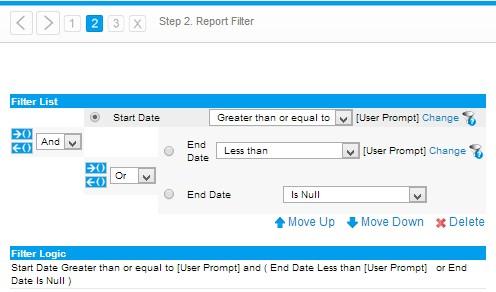
The start date is in as greater than.
The end date is in there twice, once as less than, once as 'or' is null.
If we're still missing something, maybe you can show us how you have stored the data, and how the view has been built in Yellowfin.
Regards,
David
Thanks for the more info.
It still looks pretty easy though, so wondering have you tried this:
The start date is in as greater than.
The end date is in there twice, once as less than, once as 'or' is null.
If we're still missing something, maybe you can show us how you have stored the data, and how the view has been built in Yellowfin.
Regards,
David
Hi David,
I tried this with the salesorderdate, comparing it with the start- and enddate. But while doing this, it only shows the dates where at least one salesorder has been placed and the value of those rows that have that salesorderdate.
I want to show the total value of all rows, whatever salesorderdate, that are valid at a specific date. So for that, I want to use the date dimension to join on and the comparing of the dates has to be done in the joins of the date and salesorders view.
I can create the report with freehand sql (see example), but I want my users to be able to do make joins like this in the report builder:
[code]SELECT dd.Date, sum([Order total]) as [Order total]
FROM DimDate dd
left join FactSalesorder on Startdate dd.Date OR Enddate is null)
group by dd.Date[/code]
Regards,
Ruben
I tried this with the salesorderdate, comparing it with the start- and enddate. But while doing this, it only shows the dates where at least one salesorder has been placed and the value of those rows that have that salesorderdate.
I want to show the total value of all rows, whatever salesorderdate, that are valid at a specific date. So for that, I want to use the date dimension to join on and the comparing of the dates has to be done in the joins of the date and salesorders view.
I can create the report with freehand sql (see example), but I want my users to be able to do make joins like this in the report builder:
[code]SELECT dd.Date, sum([Order total]) as [Order total]
FROM DimDate dd
left join FactSalesorder on Startdate dd.Date OR Enddate is null)
group by dd.Date[/code]
Regards,
Ruben
Hi Ruben,
Awesome, thanks for that!
Unfortunately there is no way to do this in YF, as you have a join + a condition.
In our view builder, you can do your Startdate <= dd.Date, but you cannot use the IS NULL condition in the join.
The only way to do this is to use either a virtual table or a freehand sql report.
Sorry for the inconvenience.
Regards,
David
Awesome, thanks for that!
Unfortunately there is no way to do this in YF, as you have a join + a condition.
In our view builder, you can do your Startdate <= dd.Date, but you cannot use the IS NULL condition in the join.
The only way to do this is to use either a virtual table or a freehand sql report.
Sorry for the inconvenience.
Regards,
David
Hi David,
I've made a virtual table with the query above, instead of the order total I use the keys to the facttable so I can join the tables in the view, now it works perfectly! Exactly what I needed :) Thank you!
Regards,
Ruben
I've made a virtual table with the query above, instead of the order total I use the keys to the facttable so I can join the tables in the view, now it works perfectly! Exactly what I needed :) Thank you!
Regards,
Ruben